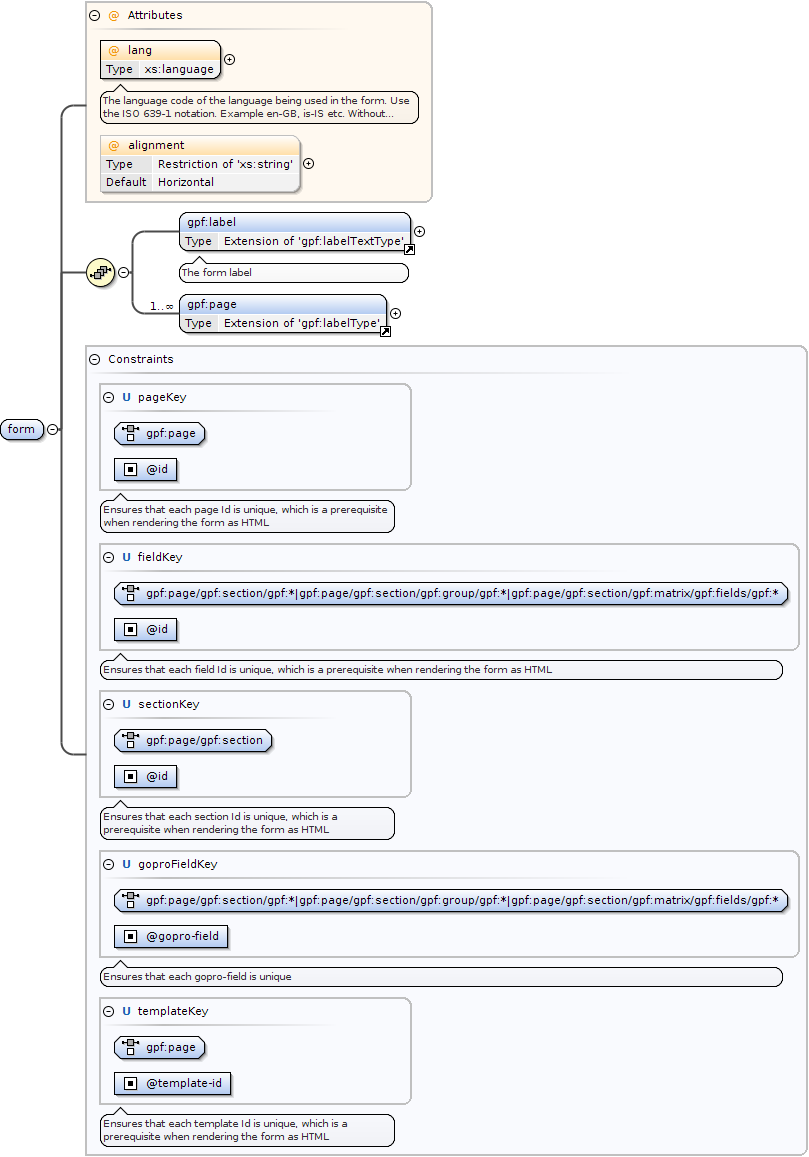
The language code of the language being used in the form.Use the ISO 639-1 notation. Example en-GB, is-IS etc. Without correct language selectionThe corresponding static and lookup lists will not be loaded correctly unless the form locale is correctly set.
<xs:element name="form"><xs:complexType><xs:sequence><xs:element ref="gpf:label" maxOccurs="1" minOccurs="1"><xs:annotation><xs:documentation>The form label</xs:documentation></xs:annotation></xs:element><xs:element ref="gpf:page" minOccurs="1" maxOccurs="unbounded"/></xs:sequence><xs:attribute name="lang" use="required" type="xs:language"><xs:annotation><xs:documentation>The language code of the language being used in the form. Use the ISO 639-1 notation. Example en-GB, is-IS etc. Without correct language selection The corresponding static and lookup lists will not be loaded correctly unless the form locale is correctly set.</xs:documentation></xs:annotation></xs:attribute><xs:attribute name="alignment" use="optional" default="Horizontal"><xs:simpleType><xs:restriction base="xs:string"><xs:enumeration value="Stacked"/><xs:enumeration value="Horizontal"/></xs:restriction></xs:simpleType></xs:attribute></xs:complexType><xs:unique name="pageKey"><xs:annotation><xs:documentation>Ensures that each page Id is unique, which is a prerequisite when rendering the form as HTML</xs:documentation></xs:annotation><xs:selector xpath="gpf:page"/><xs:field xpath="@id"/></xs:unique><xs:unique name="fieldKey"><xs:annotation><xs:documentation>Ensures that each field Id is unique, which is a prerequisite when rendering the form as HTML</xs:documentation></xs:annotation><xs:selector xpath="gpf:page/gpf:section/gpf:*|gpf:page/gpf:section/gpf:group/gpf:*|gpf:page/gpf:section/gpf:matrix/gpf:fields/gpf:*"/><xs:field xpath="@id"/></xs:unique><xs:unique name="sectionKey"><xs:annotation><xs:documentation>Ensures that each section Id is unique, which is a prerequisite when rendering the form as HTML</xs:documentation></xs:annotation><xs:selector xpath="gpf:page/gpf:section"/><xs:field xpath="@id"/></xs:unique><xs:unique name="goproFieldKey"><xs:annotation><xs:documentation>Ensures that each gopro-field is unique</xs:documentation></xs:annotation><xs:selector xpath="gpf:page/gpf:section/gpf:*|gpf:page/gpf:section/gpf:group/gpf:*|gpf:page/gpf:section/gpf:matrix/gpf:fields/gpf:*"/><xs:field xpath="@gopro-field"/></xs:unique><xs:unique name="templateKey"><xs:annotation><xs:documentation>Ensures that each template Id is unique, which is a prerequisite when rendering the form as HTML</xs:documentation></xs:annotation><xs:selector xpath="gpf:page"/><xs:field xpath="@template-id"/></xs:unique></xs:element>
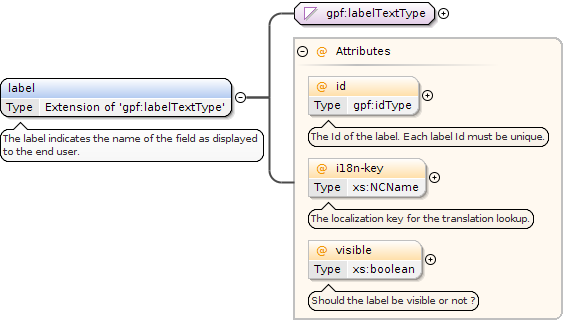
Element gpf:label
Namespace
http://rep.gopro.net/gpf/xml/schemas/
Annotations
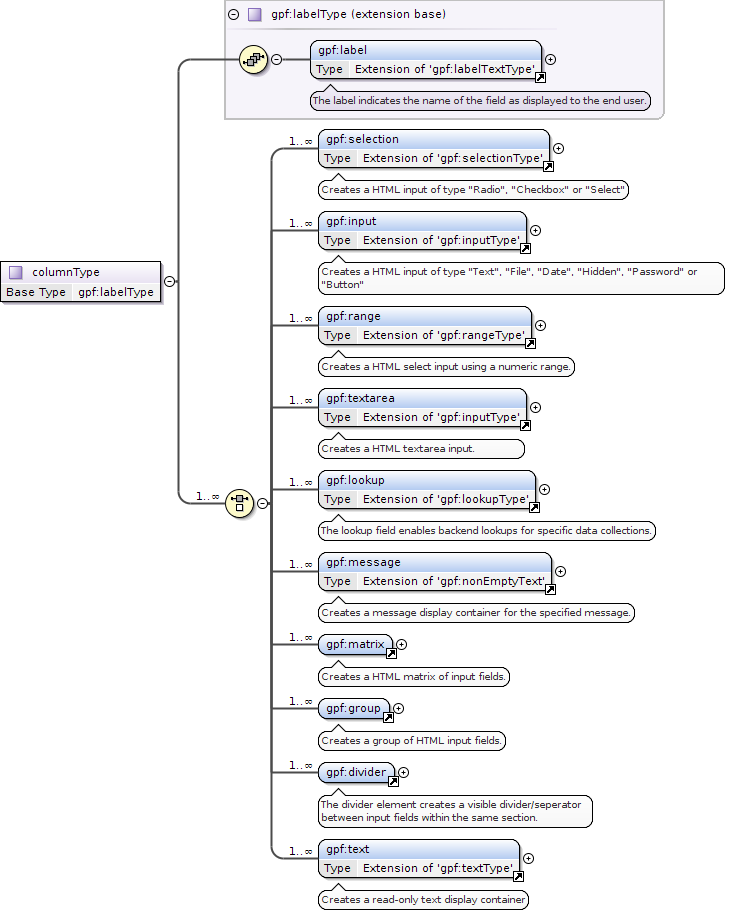
The label indicates the name of the field as displayed to the end user.
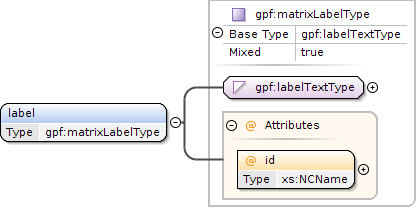
<xs:element name="label"><xs:annotation><xs:documentation>The label indicates the name of the field as displayed to the end user.</xs:documentation></xs:annotation><xs:complexType><xs:simpleContent><xs:extension base="gpf:labelTextType"><xs:attribute name="id" use="optional" type="gpf:idType"><xs:annotation><xs:documentation>The Id of the label. Each label Id must be unique.</xs:documentation></xs:annotation></xs:attribute><xs:attribute name="i18n-key" use="optional" type="xs:NCName"><xs:annotation><xs:documentation>The localization key for the translation lookup.</xs:documentation></xs:annotation></xs:attribute><xs:attribute name="visible" use="optional" type="xs:boolean"><xs:annotation><xs:documentation>Should the label be visible or not ?</xs:documentation></xs:annotation></xs:attribute></xs:extension></xs:simpleContent></xs:complexType></xs:element>
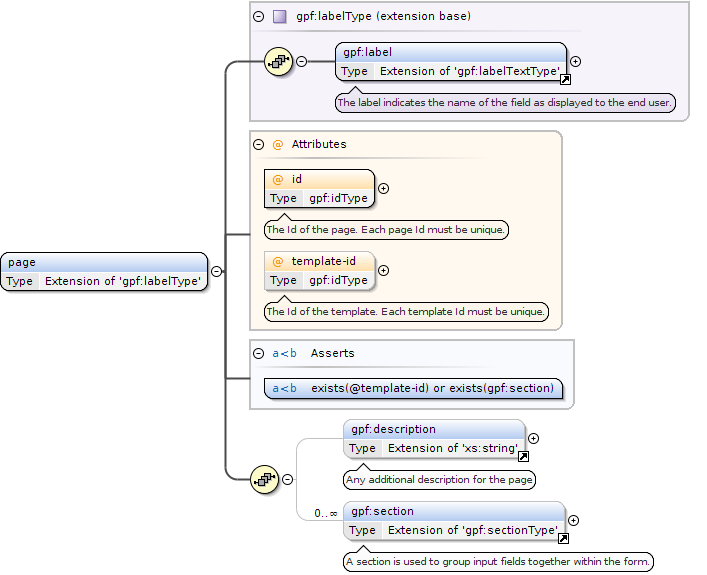
The Id of the template. Each template Id must be unique.
Asserts
Test
XPath default namespace
Annotation
exists(@template-id) or exists(gpf:section)
Source
<xs:element name="page"><xs:complexType><xs:complexContent><xs:extension base="gpf:labelType"><xs:sequence><xs:element ref="gpf:description" minOccurs="0" maxOccurs="1"><xs:annotation><xs:documentation>Any additional description for the page</xs:documentation></xs:annotation></xs:element><xs:element ref="gpf:section" minOccurs="0" maxOccurs="unbounded"/></xs:sequence><xs:attribute name="id" use="required" type="gpf:idType"><xs:annotation><xs:documentation>The Id of the page. Each page Id must be unique.</xs:documentation></xs:annotation></xs:attribute><xs:attribute name="template-id" use="optional" type="gpf:idType"><xs:annotation><xs:documentation>The Id of the template. Each template Id must be unique.</xs:documentation></xs:annotation></xs:attribute><!-- XSD 1.1 assertion --><xs:assert test="exists(@template-id) or exists(gpf:section)"/></xs:extension></xs:complexContent></xs:complexType></xs:element>
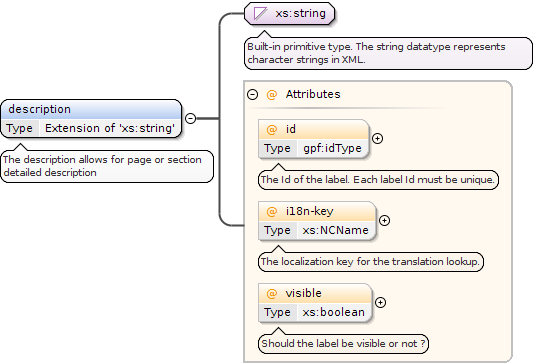
Element gpf:description
Namespace
http://rep.gopro.net/gpf/xml/schemas/
Annotations
The description allows for page or section detailed description
<xs:element name="description"><xs:annotation><xs:documentation>The description allows for page or section detailed description</xs:documentation></xs:annotation><xs:complexType><xs:simpleContent><xs:extension base="xs:string"><xs:attribute name="id" use="optional" type="gpf:idType"><xs:annotation><xs:documentation>The Id of the label. Each label Id must be unique.</xs:documentation></xs:annotation></xs:attribute><xs:attribute name="i18n-key" use="optional" type="xs:NCName"><xs:annotation><xs:documentation>The localization key for the translation lookup.</xs:documentation></xs:annotation></xs:attribute><xs:attribute name="visible" use="optional" type="xs:boolean"><xs:annotation><xs:documentation>Should the label be visible or not ?</xs:documentation></xs:annotation></xs:attribute></xs:extension></xs:simpleContent></xs:complexType></xs:element>
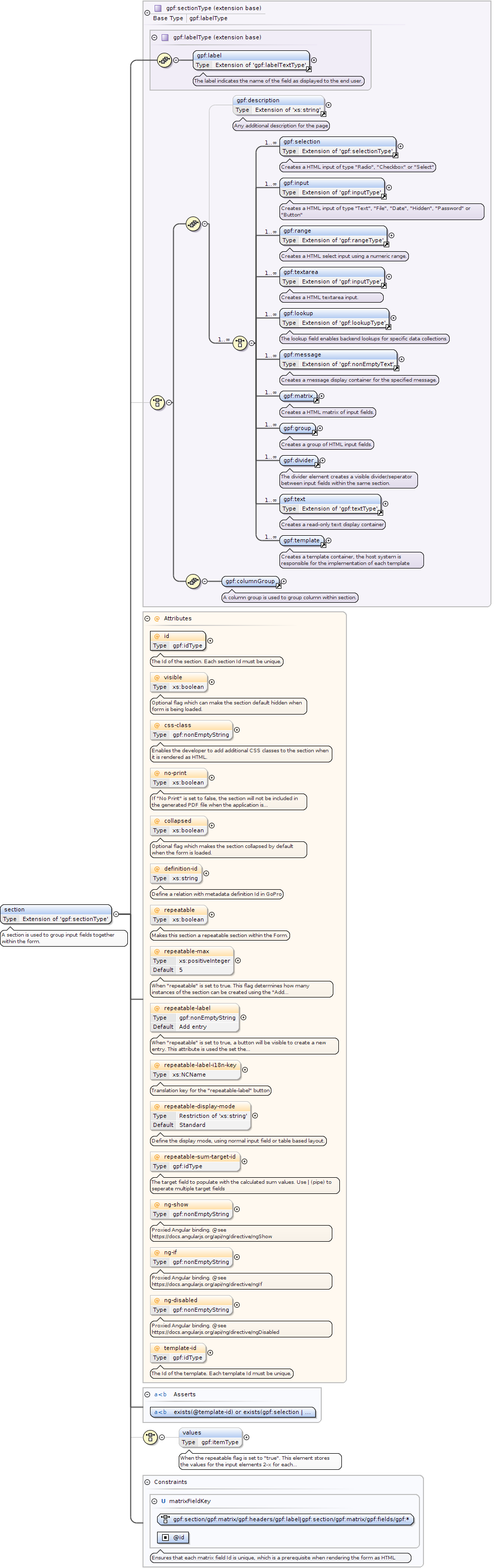
Element gpf:section
Namespace
http://rep.gopro.net/gpf/xml/schemas/
Annotations
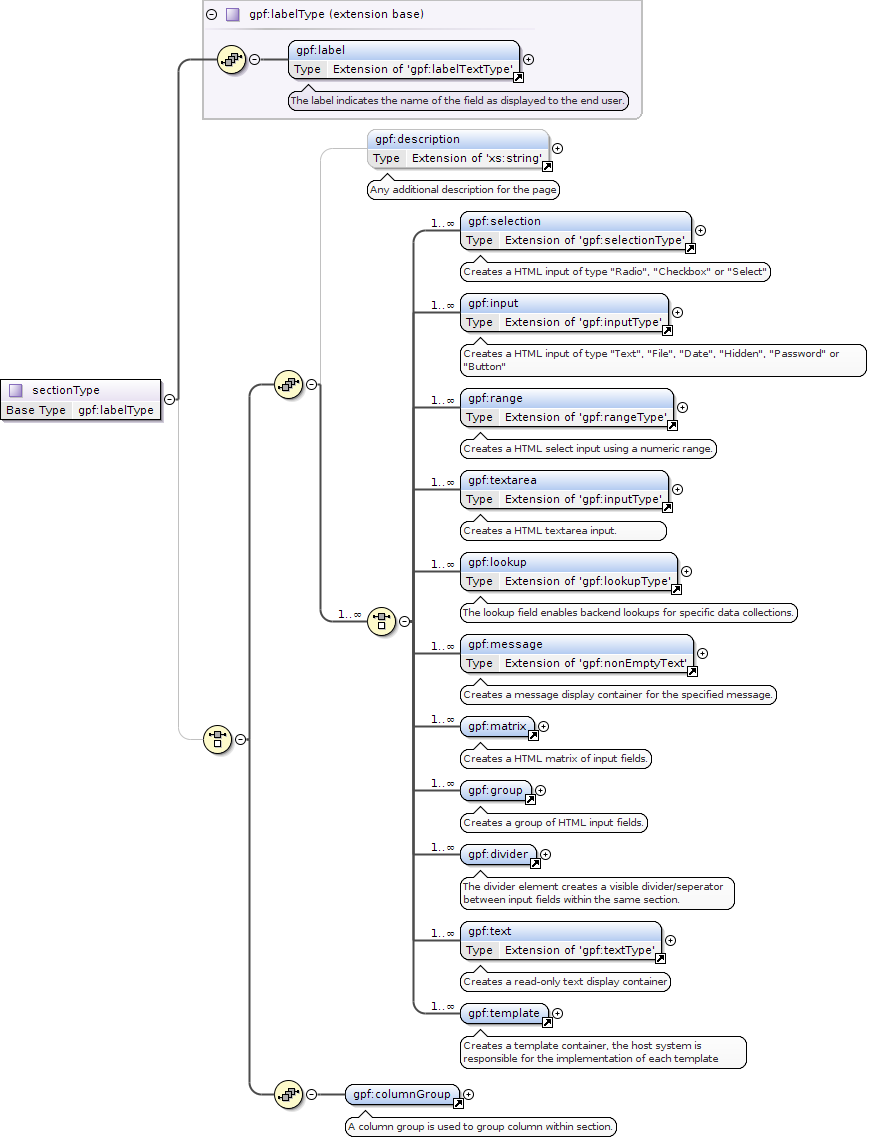
A section is used to group input fields together within the form.
<xs:element name="section"><xs:annotation><xs:documentation>A section is used to group input fields together within the form.</xs:documentation></xs:annotation><xs:complexType><xs:complexContent><xs:extension base="gpf:sectionType"><xs:choice minOccurs="0" maxOccurs="1"><xs:element type="gpf:itemType" name="values" minOccurs="0" maxOccurs="1"><xs:annotation><xs:documentation>When the repeatable flag is set to "true". This element stores the values for the input elements 2-x for each repeatable section.</xs:documentation></xs:annotation><xs:unique name="itemOrderKey"><xs:annotation><xs:documentation>Ensures that each order is unique.</xs:documentation></xs:annotation><xs:selector xpath="gpf:item"/><xs:field xpath="@order"/></xs:unique></xs:element></xs:choice><xs:attribute name="id" use="required" type="gpf:idType"><xs:annotation><xs:documentation>The Id of the section. Each section Id must be unique.</xs:documentation></xs:annotation></xs:attribute><xs:attribute name="visible" use="optional" type="xs:boolean"><xs:annotation><xs:documentation>Optional flag which can make the section default hidden when form is being loaded.</xs:documentation></xs:annotation></xs:attribute><xs:attribute name="css-class" type="gpf:nonEmptyString" use="optional"><xs:annotation><xs:documentation>Enables the developer to add additional CSS classes to the section when it is rendered as HTML.</xs:documentation></xs:annotation></xs:attribute><xs:attribute name="no-print" use="optional" type="xs:boolean"><xs:annotation><xs:documentation>If "No Print" is set to false, the section will not be included in the generated PDF file when the application is submitted</xs:documentation></xs:annotation></xs:attribute><xs:attribute name="collapsed" use="optional" type="xs:boolean"><xs:annotation><xs:documentation>Optional flag which makes the section collapsed by default when the form is loaded.</xs:documentation></xs:annotation></xs:attribute><xs:attribute name="definition-id" type="xs:string" use="optional"><xs:annotation><xs:documentation>Define a relation with metadata definition Id in GoPro</xs:documentation></xs:annotation></xs:attribute><xs:attribute name="repeatable" use="optional" type="xs:boolean"><xs:annotation><xs:documentation>Makes this section a repeatable section within the Form.</xs:documentation></xs:annotation></xs:attribute><xs:attribute name="repeatable-max" use="optional" type="xs:positiveInteger" default="5"><xs:annotation><xs:documentation>When "repeatable" is set to true. This flag determines how many instances of the section can be created using the "Add entry" button.</xs:documentation></xs:annotation></xs:attribute><xs:attribute name="repeatable-label" use="optional" type="gpf:nonEmptyString" default="Add entry"><xs:annotation><xs:documentation>When "repeatable" is set to true, a button will be visible to create a new entry. This attribute is used the set the text on that button.</xs:documentation></xs:annotation></xs:attribute><xs:attribute name="repeatable-label-i18n-key" use="optional" type="xs:NCName"><xs:annotation><xs:documentation>Translation key for the "repeatable-label" button</xs:documentation></xs:annotation></xs:attribute><xs:attribute name="repeatable-display-mode" use="optional" default="Standard"><xs:annotation><xs:documentation>Define the display mode, using normal input field or table based layout.</xs:documentation></xs:annotation><xs:simpleType><xs:restriction base="xs:string"><xs:enumeration value="Standard"><xs:annotation><xs:documentation>Standard repeatable section where section fields are cloned and displayed</xs:documentation></xs:annotation></xs:enumeration><xs:enumeration value="Table"><xs:annotation><xs:documentation>New entries are created with dialog and results are displayed in an editable table</xs:documentation></xs:annotation></xs:enumeration><xs:enumeration value="TableWithSum"><xs:annotation><xs:documentation>New entries are created with dialog and results are displayed in an editable table. The last table column is used for some of column values where applicable.</xs:documentation></xs:annotation></xs:enumeration></xs:restriction></xs:simpleType></xs:attribute><xs:attribute name="repeatable-sum-target-id" type="gpf:idType" use="optional"><xs:annotation><xs:documentation>The target field to populate with the calculated sum values. Use | (pipe) to seperate multiple target fields</xs:documentation></xs:annotation></xs:attribute><xs:attribute name="ng-show" type="gpf:nonEmptyString" use="optional"><xs:annotation><xs:documentation>Proxied Angular binding. @see https://docs.angularjs.org/api/ng/directive/ngShow</xs:documentation></xs:annotation></xs:attribute><xs:attribute name="ng-if" type="gpf:nonEmptyString" use="optional"><xs:annotation><xs:documentation>Proxied Angular binding. @see https://docs.angularjs.org/api/ng/directive/ngIf</xs:documentation></xs:annotation></xs:attribute><xs:attribute name="ng-disabled" type="gpf:nonEmptyString" use="optional"><xs:annotation><xs:documentation>Proxied Angular binding. @see https://docs.angularjs.org/api/ng/directive/ngDisabled</xs:documentation></xs:annotation></xs:attribute><xs:attribute name="template-id" use="optional" type="gpf:idType"><xs:annotation><xs:documentation>The Id of the template. Each template Id must be unique.</xs:documentation></xs:annotation></xs:attribute><!-- XSD 1.1 assertion --><xs:assert test="exists(@template-id) or exists(gpf:selection | gpf:input | gpf:range | gpf:textarea | gpf:lookup | gpf:message | gpf:matrix | gpf:group | gpf:text | gpf:template)"/></xs:extension></xs:complexContent></xs:complexType><xs:unique name="matrixFieldKey"><xs:annotation><xs:documentation>Ensures that each matrix field Id is unique, which is a prerequisite when rendering the form as HTML</xs:documentation></xs:annotation><xs:selector xpath="gpf:section/gpf:matrix/gpf:headers/gpf:label|gpf:section/gpf:matrix/gpf:fields/gpf:*"/><xs:field xpath="@id"/></xs:unique></xs:element>
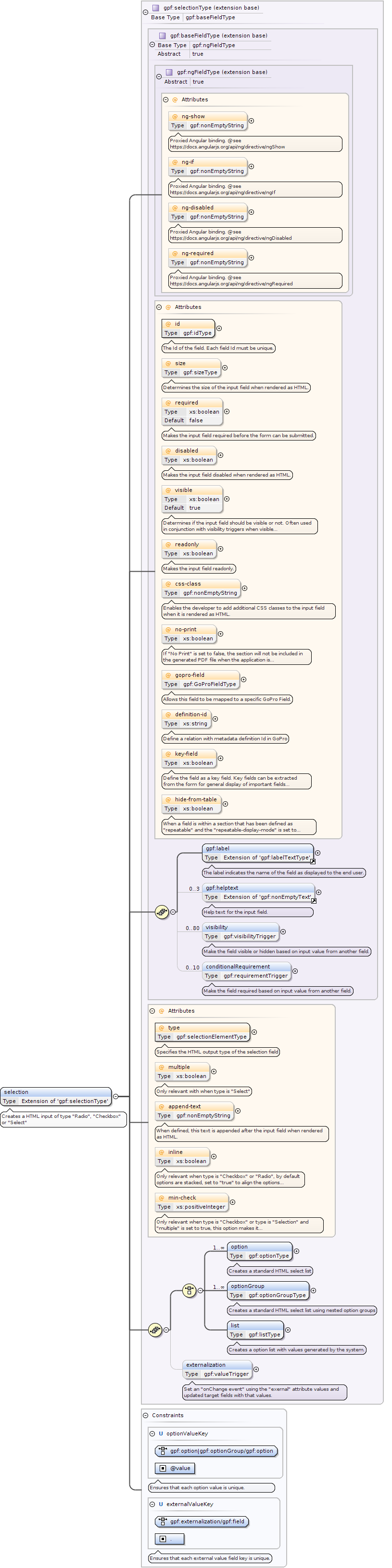
Element gpf:selection
Namespace
http://rep.gopro.net/gpf/xml/schemas/
Annotations
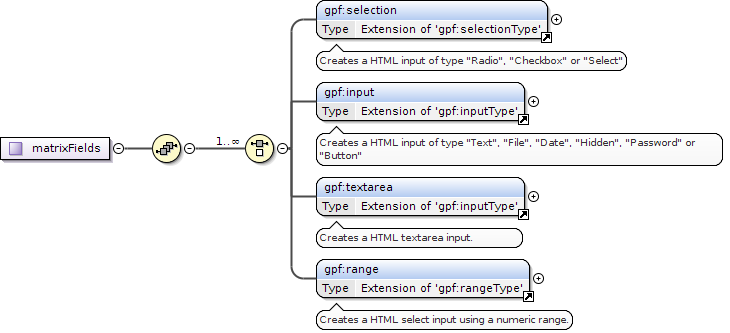
Creates a HTML input of type "Radio", "Checkbox" or "Select"
When a field is within a section that has been defined as "repeatable" and the "repeatable-display-mode" is set to "Table",then this attribute can be set to "true" so the field value will not be shown within the rendered table.
Only relevant when type is "Checkbox" or type is "Selection" and "multiple" is set to true,this option makes it required to select at least X options from the list when defined.
Determines if the input field should be visible or not. Often used in conjunction with visibility triggers when visible is set to false.
Identity constraints
QName
Type
Refer
Selector
Field(s)
optionValueKey
unique
gpf:option|gpf:optionGroup/gpf:option
@value
externalValueKey
unique
gpf:externalization/gpf:field
.
Source
<xs:element name="selection"><xs:annotation><xs:documentation>Creates a HTML input of type "Radio", "Checkbox" or "Select"</xs:documentation></xs:annotation><xs:complexType><xs:complexContent><xs:extension base="gpf:selectionType"/></xs:complexContent></xs:complexType><xs:unique name="optionValueKey"><xs:annotation><xs:documentation>Ensures that each option value is unique.</xs:documentation></xs:annotation><xs:selector xpath="gpf:option|gpf:optionGroup/gpf:option"/><xs:field xpath="@value"/></xs:unique><xs:unique name="externalValueKey"><xs:annotation><xs:documentation>Ensures that each external value field key is unique.</xs:documentation></xs:annotation><xs:selector xpath="gpf:externalization/gpf:field"/><xs:field xpath="."/></xs:unique></xs:element>
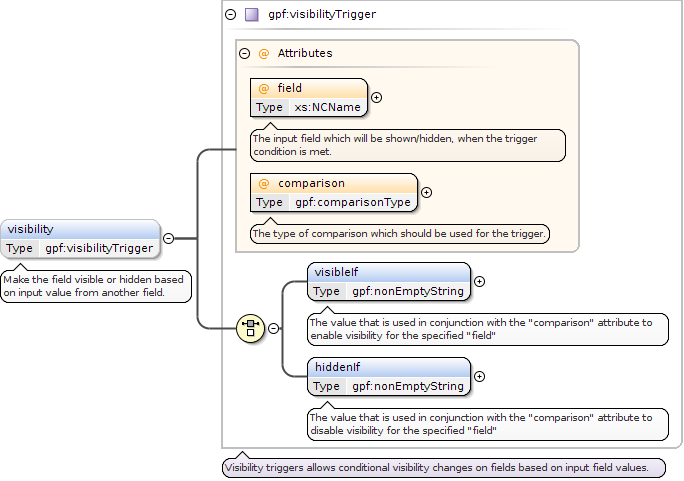
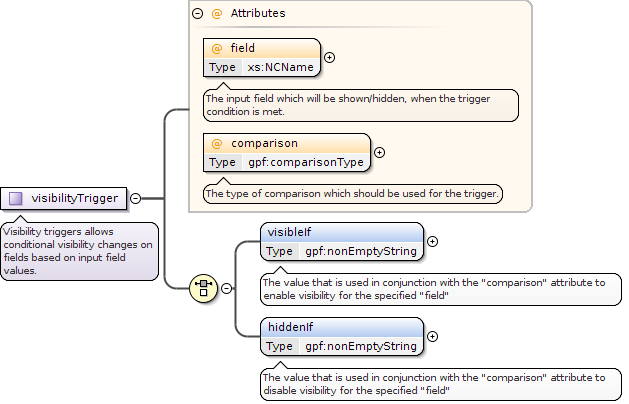
The input field which will be shown/hidden, when the trigger condition is met.
Source
<xs:element type="gpf:visibilityTrigger" name="visibility" minOccurs="0" maxOccurs="80"><xs:annotation><xs:documentation>Make the field visible or hidden based on input value from another field.</xs:documentation></xs:annotation></xs:element>
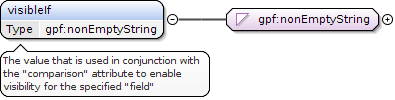
<xs:element name="visibleIf" type="gpf:nonEmptyString"><xs:annotation><xs:documentation>The value that is used in conjunction with the "comparison" attribute to enable visibility for the specified "field"</xs:documentation></xs:annotation></xs:element>
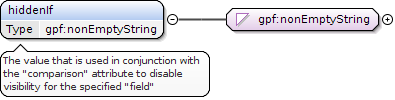
<xs:element name="hiddenIf" type="gpf:nonEmptyString"><xs:annotation><xs:documentation>The value that is used in conjunction with the "comparison" attribute to disable visibility for the specified "field"</xs:documentation></xs:annotation></xs:element>
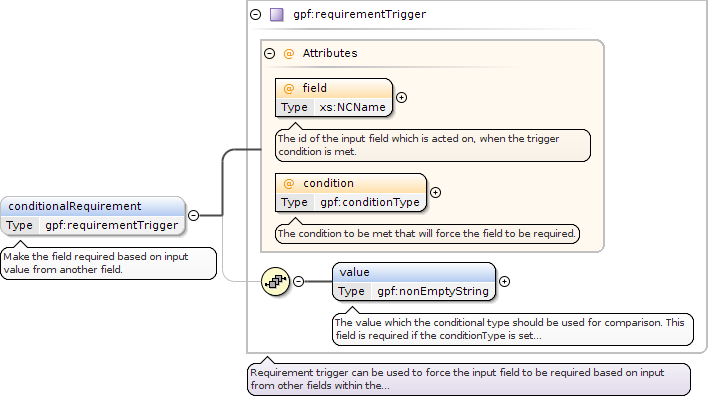
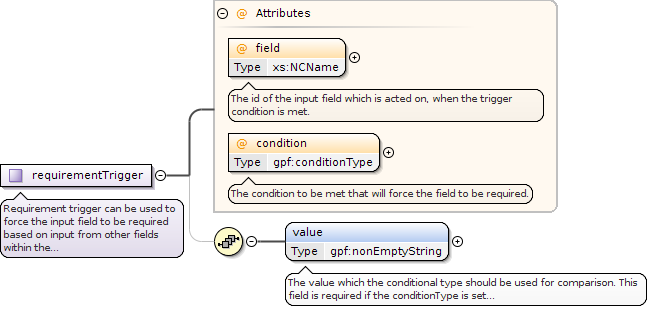
The id of the input field which is acted on, when the trigger condition is met.
Source
<xs:element type="gpf:requirementTrigger" name="conditionalRequirement" minOccurs="0" maxOccurs="10"><xs:annotation><xs:documentation>Make the field required based on input value from another field.</xs:documentation></xs:annotation></xs:element>
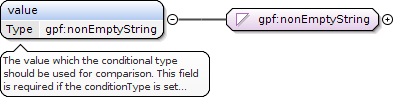
<xs:element name="value" type="gpf:nonEmptyString"><xs:annotation><xs:documentation>The value which the conditional type should be used for comparison. This field is required if the conditionType is set to "Equals", "Less" or "More"</xs:documentation></xs:annotation></xs:element>
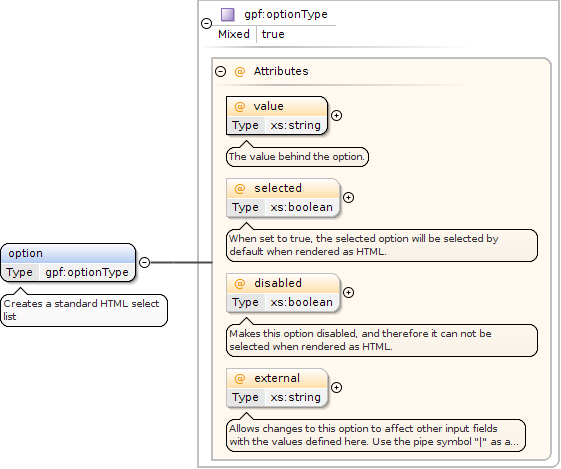
Allows changes to this option to affect other input fields with the values defined here. Use the pipe symbol "|" as a delimiter for multiple values.Use the externalTrigger directive to choose which fields should be the target fields for the specified data.
<xs:element name="option" type="gpf:optionType" maxOccurs="unbounded"><xs:annotation><xs:documentation>Creates a standard HTML select list</xs:documentation></xs:annotation></xs:element>
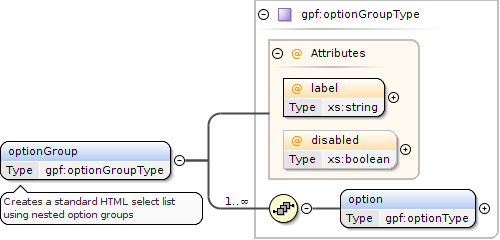
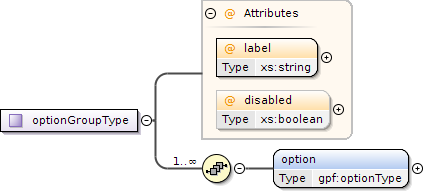
<xs:element name="optionGroup" type="gpf:optionGroupType" maxOccurs="unbounded"><xs:annotation><xs:documentation>Creates a standard HTML select list using nested option groups</xs:documentation></xs:annotation></xs:element>
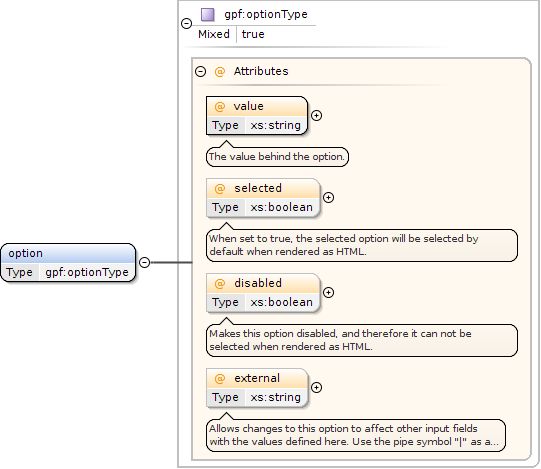
Allows changes to this option to affect other input fields with the values defined here. Use the pipe symbol "|" as a delimiter for multiple values.Use the externalTrigger directive to choose which fields should be the target fields for the specified data.
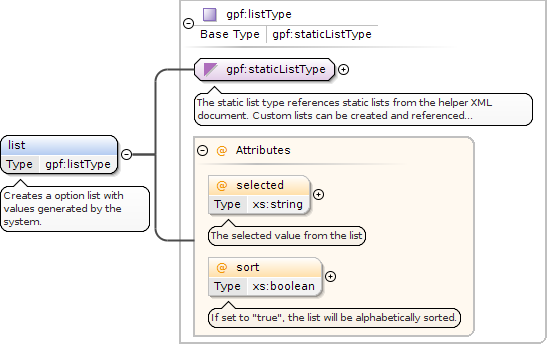
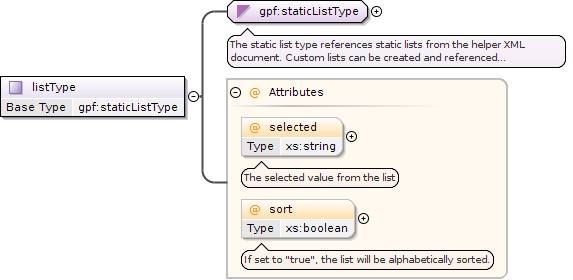
If set to "true", the list will be alphabetically sorted.
Source
<xs:element name="list" type="gpf:listType" maxOccurs="1"><xs:annotation><xs:documentation>Creates a option list with values generated by the system.</xs:documentation></xs:annotation></xs:element>
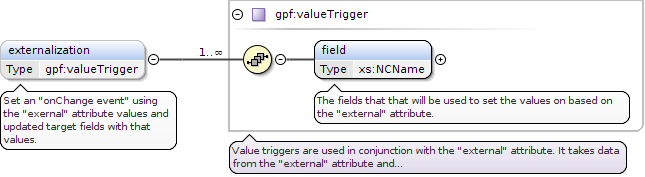
<xs:element type="gpf:valueTrigger" name="externalization" minOccurs="0" maxOccurs="1"><xs:annotation><xs:documentation>Set an "onChange event" using the "exernal" attribute values and updated target fields with that values.</xs:documentation></xs:annotation></xs:element>
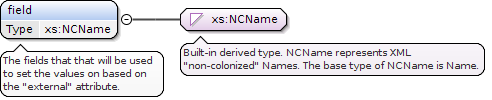
The fields that that will be used to set the values on based on the "external" attribute.
Diagram
Type
xs:NCName
Properties
content
simple
Source
<xs:element name="field" type="xs:NCName"><xs:annotation><xs:documentation>The fields that that will be used to set the values on based on the "external" attribute.</xs:documentation></xs:annotation></xs:element>
Element gpf:input
Namespace
http://rep.gopro.net/gpf/xml/schemas/
Annotations
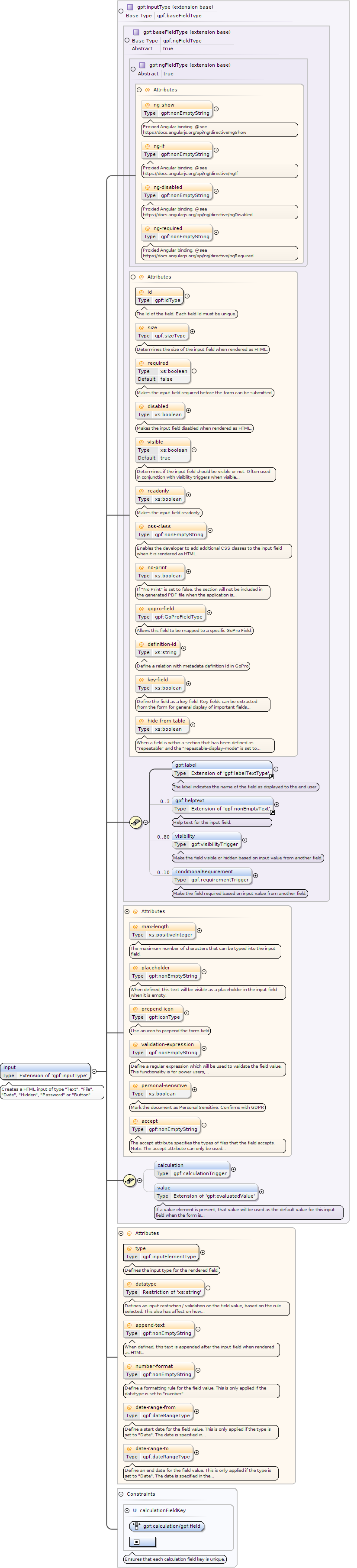
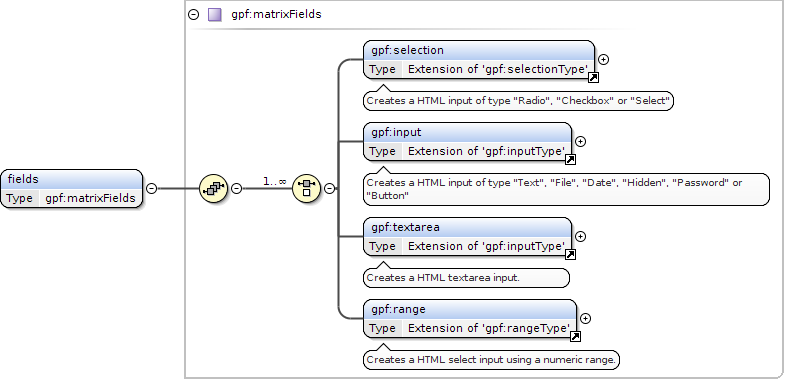
Creates a HTML input of type "Text", "File", "Date", "Hidden", "Password" or "Button"
The accept attribute specifies the types of files that the field accepts.Note: The accept attribute can only be used with type="file"Use same syntax as the HTML5 accept attribute.
Defines an input restriction / validation on the field value, based on the rule selected. This also has affect on how the MetaValueType is set in GoPro
Define a start date for the field value. This is only applied if the type is set to "Date".The date is specified in the following form "YYYY-MM-DD". Constants "today", "yesterday" and "tomorrow" can also be used.
Define an end date for the field value. This is only applied if the type is set to "Date".The date is specified in the following form "YYYY-MM-DD". Constants "today", "yesterday" and "tomorrow" can also be used.
When a field is within a section that has been defined as "repeatable" and the "repeatable-display-mode" is set to "Table",then this attribute can be set to "true" so the field value will not be shown within the rendered table.
Define a regular expression which will be used to validate the field value. This functionality is for power users, invalid expressions might end up breaking the form.
Determines if the input field should be visible or not. Often used in conjunction with visibility triggers when visible is set to false.
Identity constraints
QName
Type
Refer
Selector
Field(s)
calculationFieldKey
unique
gpf:calculation/gpf:field
.
Source
<xs:element name="input"><xs:annotation><xs:documentation>Creates a HTML input of type "Text", "File", "Date", "Hidden", "Password" or "Button"</xs:documentation></xs:annotation><xs:complexType><xs:complexContent><xs:extension base="gpf:inputType"><xs:attribute name="type" type="gpf:inputElementType" use="required"><xs:annotation><xs:documentation>Defines the input type for the rendered field.</xs:documentation></xs:annotation></xs:attribute><xs:attribute name="datatype" use="optional"><xs:annotation><xs:documentation>Defines an input restriction / validation on the field value, based on the rule selected. This also has affect on how the MetaValueType is set in GoPro</xs:documentation></xs:annotation><xs:simpleType><xs:restriction base="xs:string"><xs:enumeration value="text"><xs:annotation><xs:documentation>Sets GoPro MetaValueType to MetaValueType.STRING</xs:documentation></xs:annotation></xs:enumeration><xs:enumeration value="number"><xs:annotation><xs:documentation>Restrict input to a number value, without fraction point. Sets GoPro MetaValueType to MetaValueType.INT</xs:documentation></xs:annotation></xs:enumeration><xs:enumeration value="email"><xs:annotation><xs:documentation>UI checks for valid email. Sets GoPro MetaValueType to MetaValueType.STRING</xs:documentation></xs:annotation></xs:enumeration><xs:enumeration value="url"><xs:annotation><xs:documentation>UI checks for valid URL. Sets GoPro MetaValueType to MetaValueType.STRING</xs:documentation></xs:annotation></xs:enumeration><xs:enumeration value="ssn-is"><xs:annotation><xs:documentation>UI checks for valid SSN. Sets GoPro MetaValueType to MetaValueType.STRING</xs:documentation></xs:annotation></xs:enumeration><xs:enumeration value="boolean"><xs:annotation><xs:documentation>Boolean value, (0 or 1) and (true and false) are accepted. Sets GoPro MetaValueType to MetaValueType.BOOLEAN</xs:documentation></xs:annotation></xs:enumeration><xs:enumeration value="int"><xs:annotation><xs:documentation>Integer values are accepted (like for number). Sets GoPro MetaValueType to MetaValueType.INT</xs:documentation></xs:annotation></xs:enumeration><xs:enumeration value="float"><xs:annotation><xs:documentation>Float values are accepted. Sets GoPro MetaValueType to MetaValueType.FLOAT</xs:documentation></xs:annotation></xs:enumeration></xs:restriction></xs:simpleType></xs:attribute><xs:attribute name="append-text" use="optional" type="gpf:nonEmptyString"><xs:annotation><xs:documentation>When defined, this text is appended after the input field when rendered as HTML.</xs:documentation></xs:annotation></xs:attribute><xs:attribute name="number-format" use="optional" type="gpf:nonEmptyString"><xs:annotation><xs:documentation>Define a formatting rule for the field value. This is only applied if the datatype is set to "number"</xs:documentation></xs:annotation></xs:attribute><xs:attribute name="date-range-from" use="optional" type="gpf:dateRangeType"><xs:annotation><xs:documentation>Define a start date for the field value. This is only applied if the type is set to "Date". The date is specified in the following form "YYYY-MM-DD". Constants "today", "yesterday" and "tomorrow" can also be used.</xs:documentation></xs:annotation></xs:attribute><xs:attribute name="date-range-to" use="optional" type="gpf:dateRangeType"><xs:annotation><xs:documentation>Define an end date for the field value. This is only applied if the type is set to "Date". The date is specified in the following form "YYYY-MM-DD". Constants "today", "yesterday" and "tomorrow" can also be used.</xs:documentation></xs:annotation></xs:attribute></xs:extension></xs:complexContent></xs:complexType><xs:unique name="calculationFieldKey"><xs:annotation><xs:documentation>Ensures that each calculation field key is unique.</xs:documentation></xs:annotation><xs:selector xpath="gpf:calculation/gpf:field"/><xs:field xpath="."/></xs:unique></xs:element>
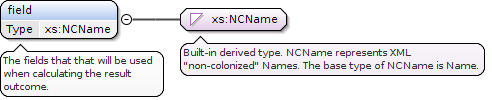
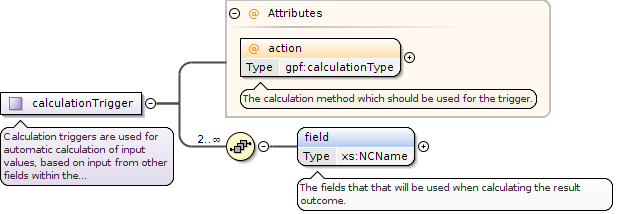
The fields that that will be used when calculating the result outcome.
Diagram
Type
xs:NCName
Properties
content
simple
Source
<xs:element name="field" type="xs:NCName"><xs:annotation><xs:documentation>The fields that that will be used when calculating the result outcome.</xs:documentation></xs:annotation></xs:element>
<xs:element name="value" minOccurs="0" maxOccurs="1"><xs:annotation><xs:documentation>If a value element is present, that value will be used as the default value for this input field when the form is loaded for the first time.</xs:documentation></xs:annotation><xs:complexType><xs:simpleContent><xs:extension base="gpf:evaluatedValue"/></xs:simpleContent></xs:complexType></xs:element>
Element gpf:range
Namespace
http://rep.gopro.net/gpf/xml/schemas/
Annotations
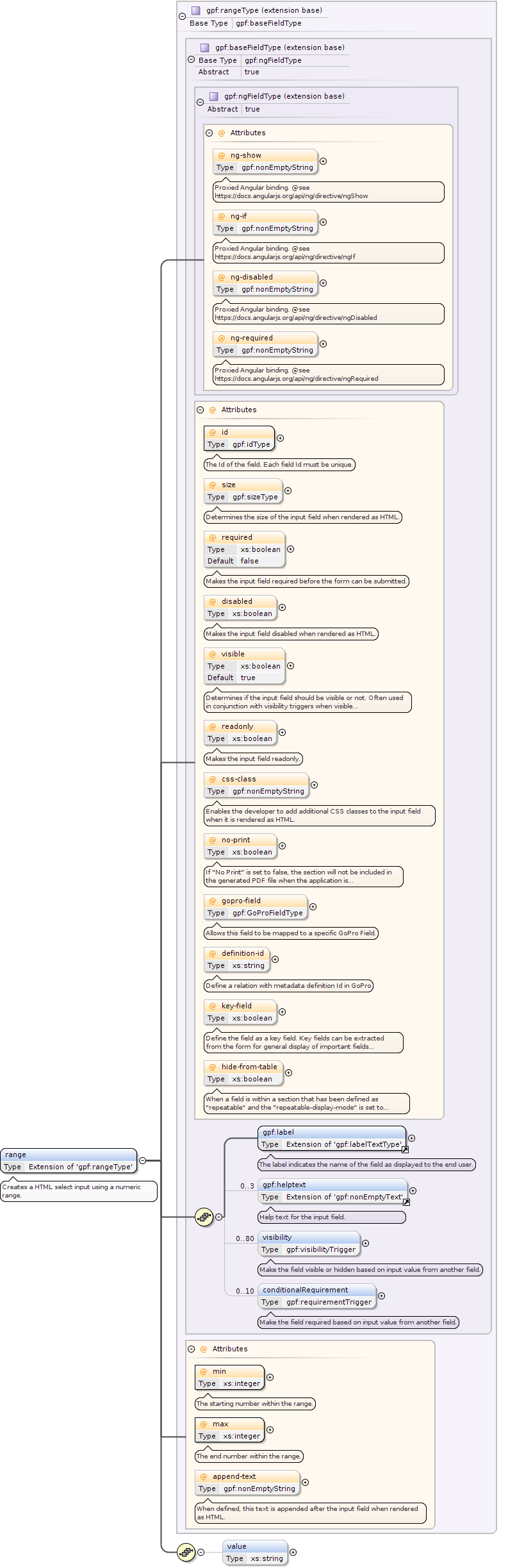
Creates a HTML select input using a numeric range.
When a field is within a section that has been defined as "repeatable" and the "repeatable-display-mode" is set to "Table",then this attribute can be set to "true" so the field value will not be shown within the rendered table.
Determines if the input field should be visible or not. Often used in conjunction with visibility triggers when visible is set to false.
Source
<xs:element name="range"><xs:annotation><xs:documentation>Creates a HTML select input using a numeric range.</xs:documentation></xs:annotation><xs:complexType><xs:complexContent><xs:extension base="gpf:rangeType"><xs:sequence><xs:element minOccurs="0" maxOccurs="1" name="value" type="xs:string"/></xs:sequence></xs:extension></xs:complexContent></xs:complexType></xs:element>
The accept attribute specifies the types of files that the field accepts.Note: The accept attribute can only be used with type="file"Use same syntax as the HTML5 accept attribute.
When a field is within a section that has been defined as "repeatable" and the "repeatable-display-mode" is set to "Table",then this attribute can be set to "true" so the field value will not be shown within the rendered table.
Define a regular expression which will be used to validate the field value. This functionality is for power users, invalid expressions might end up breaking the form.
Determines if the input field should be visible or not. Often used in conjunction with visibility triggers when visible is set to false.
Source
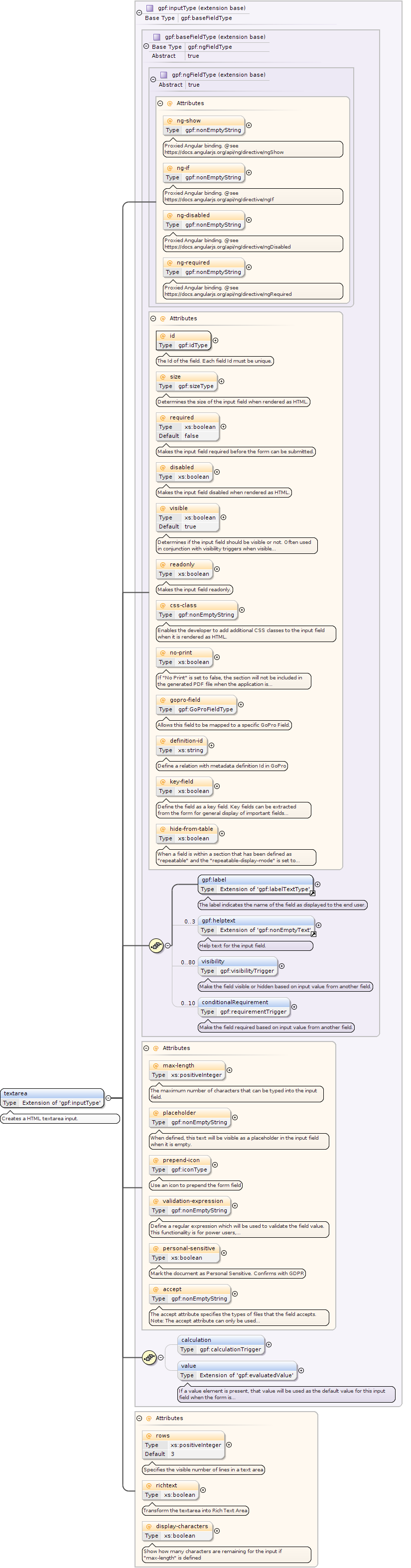
<xs:element name="textarea"><xs:annotation><xs:documentation>Creates a HTML textarea input.</xs:documentation></xs:annotation><xs:complexType><xs:complexContent><xs:extension base="gpf:inputType"><xs:attribute name="rows" type="xs:positiveInteger" use="optional" default="3"><xs:annotation><xs:documentation>Specifies the visible number of lines in a text area</xs:documentation></xs:annotation></xs:attribute><xs:attribute name="richtext" type="xs:boolean" use="optional"><xs:annotation><xs:documentation>Transform the textarea into Rich Text Area</xs:documentation></xs:annotation></xs:attribute><xs:attribute name="display-characters" use="optional" type="xs:boolean"><xs:annotation><xs:documentation>Show how many characters are remaining for the input if "max-length" is defined</xs:documentation></xs:annotation></xs:attribute></xs:extension></xs:complexContent></xs:complexType></xs:element>
Element gpf:lookup
Namespace
http://rep.gopro.net/gpf/xml/schemas/
Annotations
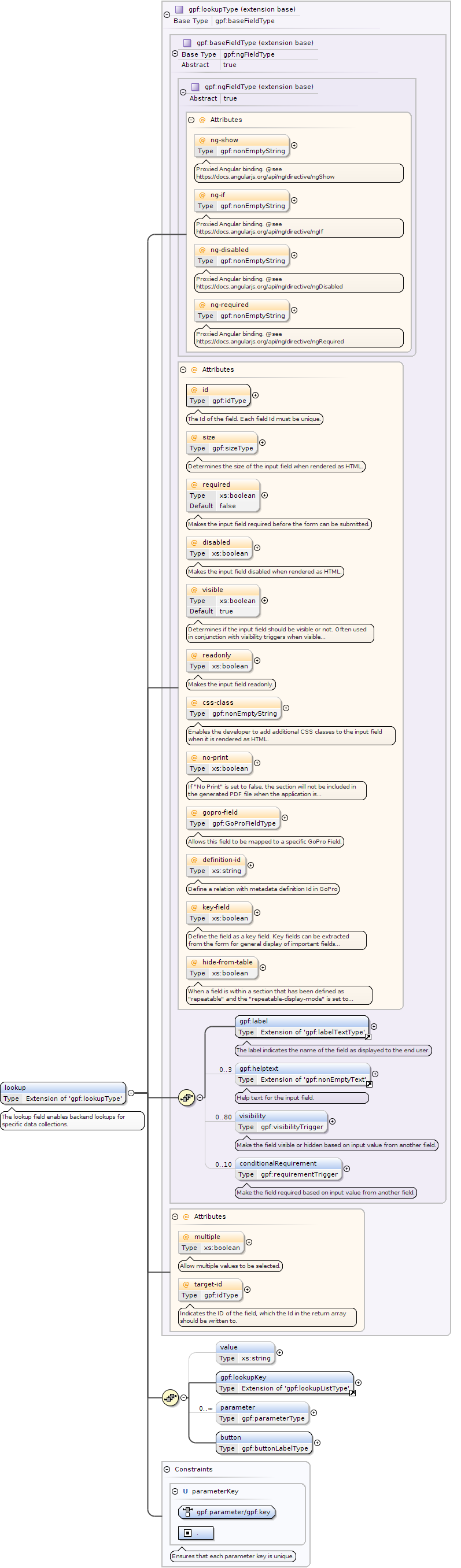
The lookup field enables backend lookups for specific data collections.
When a field is within a section that has been defined as "repeatable" and the "repeatable-display-mode" is set to "Table",then this attribute can be set to "true" so the field value will not be shown within the rendered table.
Determines if the input field should be visible or not. Often used in conjunction with visibility triggers when visible is set to false.
Identity constraints
QName
Type
Refer
Selector
Field(s)
parameterKey
unique
gpf:parameter/gpf:key
.
Source
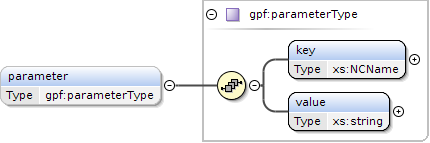
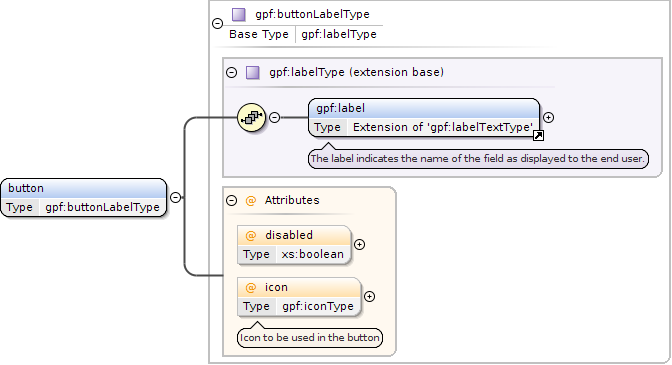
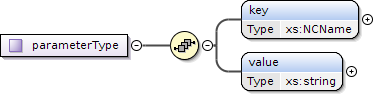
<xs:element name="lookup"><xs:annotation><xs:documentation>The lookup field enables backend lookups for specific data collections.</xs:documentation></xs:annotation><xs:complexType><xs:complexContent><xs:extension base="gpf:lookupType"><xs:sequence><xs:element minOccurs="0" maxOccurs="1" name="value" type="xs:string"/><xs:element ref="gpf:lookupKey" maxOccurs="1" minOccurs="1"/><xs:element name="parameter" type="gpf:parameterType" minOccurs="0" maxOccurs="unbounded"/><xs:element name="button" type="gpf:buttonLabelType"/></xs:sequence></xs:extension></xs:complexContent></xs:complexType><xs:unique name="parameterKey"><xs:annotation><xs:documentation>Ensures that each parameter key is unique.</xs:documentation></xs:annotation><xs:selector xpath="gpf:parameter/gpf:key"/><xs:field xpath="."/></xs:unique></xs:element>
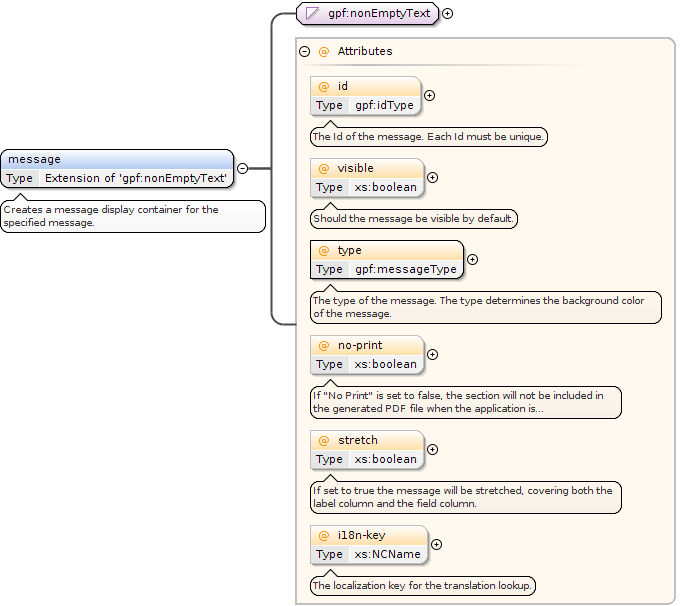
<xs:element name="message"><xs:annotation><xs:documentation>Creates a message display container for the specified message.</xs:documentation></xs:annotation><xs:complexType><xs:simpleContent><xs:extension base="gpf:nonEmptyText"><xs:attribute name="id" type="gpf:idType" use="optional"><xs:annotation><xs:documentation>The Id of the message. Each Id must be unique.</xs:documentation></xs:annotation></xs:attribute><xs:attribute name="visible" type="xs:boolean" use="optional"><xs:annotation><xs:documentation>Should the message be visible by default.</xs:documentation></xs:annotation></xs:attribute><xs:attribute name="type" type="gpf:messageType" use="required"><xs:annotation><xs:documentation>The type of the message. The type determines the background color of the message.</xs:documentation></xs:annotation></xs:attribute><xs:attribute name="no-print" use="optional" type="xs:boolean"><xs:annotation><xs:documentation>If "No Print" is set to false, the section will not be included in the generated PDF file when the application is submitted</xs:documentation></xs:annotation></xs:attribute><xs:attribute name="stretch" type="xs:boolean" use="optional"><xs:annotation><xs:documentation>If set to true the message will be stretched, covering both the label column and the field column.</xs:documentation></xs:annotation></xs:attribute><xs:attribute name="i18n-key" use="optional" type="xs:NCName"><xs:annotation><xs:documentation>The localization key for the translation lookup.</xs:documentation></xs:annotation></xs:attribute></xs:extension></xs:simpleContent></xs:complexType></xs:element>
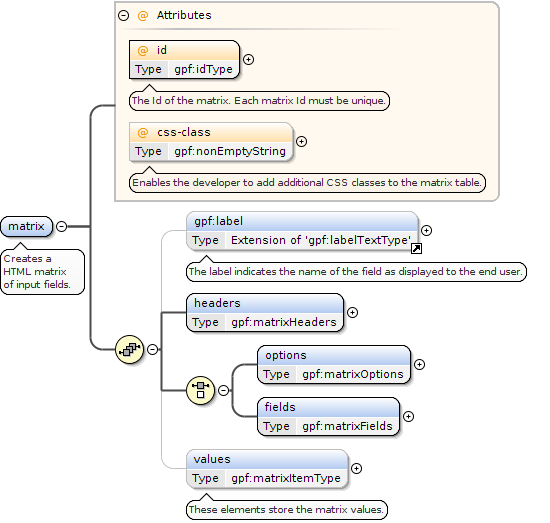
The Id of the matrix. Each matrix Id must be unique.
Source
<xs:element name="matrix"><xs:annotation><xs:documentation>Creates a HTML matrix of input fields.</xs:documentation></xs:annotation><xs:complexType><xs:sequence><xs:element ref="gpf:label" minOccurs="0" maxOccurs="1"/><xs:element name="headers" type="gpf:matrixHeaders"><xs:unique name="headerLabelKey"><xs:annotation><xs:documentation>Ensures unique header key, which is a prerequisite when rendering the form as HTML.</xs:documentation></xs:annotation><xs:selector xpath="gpf:label"/><xs:field xpath="@id"/></xs:unique></xs:element><xs:choice><xs:element name="options" type="gpf:matrixOptions"><xs:unique name="optionKey"><xs:annotation><xs:documentation>Ensures unique key for each option, which is a prerequisite when rendering the form as HTML.</xs:documentation></xs:annotation><xs:selector xpath="gpf:option"/><xs:field xpath="@value"/></xs:unique></xs:element><xs:element name="fields" type="gpf:matrixFields"/></xs:choice><xs:element type="gpf:matrixItemType" name="values" minOccurs="0" maxOccurs="1"><xs:annotation><xs:documentation>These elements store the matrix values.</xs:documentation></xs:annotation><xs:unique name="itemTypeKey"><xs:selector xpath="gpf:field"/><xs:field xpath="@id"/></xs:unique></xs:element></xs:sequence><xs:attribute name="id" type="gpf:idType" use="required"><xs:annotation><xs:documentation>The Id of the matrix. Each matrix Id must be unique.</xs:documentation></xs:annotation></xs:attribute><xs:attribute name="css-class" type="gpf:nonEmptyString" use="optional"><xs:annotation><xs:documentation>Enables the developer to add additional CSS classes to the matrix table.</xs:documentation></xs:annotation></xs:attribute></xs:complexType></xs:element>
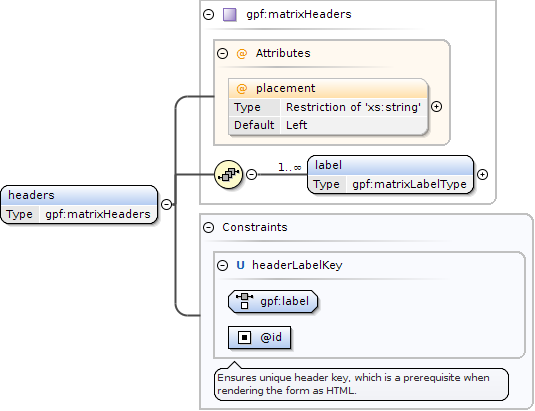
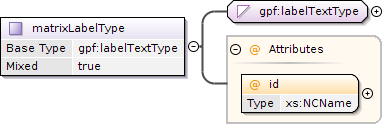
<xs:element name="headers" type="gpf:matrixHeaders"><xs:unique name="headerLabelKey"><xs:annotation><xs:documentation>Ensures unique header key, which is a prerequisite when rendering the form as HTML.</xs:documentation></xs:annotation><xs:selector xpath="gpf:label"/><xs:field xpath="@id"/></xs:unique></xs:element>
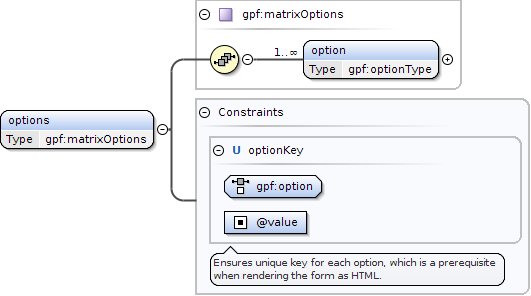
<xs:element name="options" type="gpf:matrixOptions"><xs:unique name="optionKey"><xs:annotation><xs:documentation>Ensures unique key for each option, which is a prerequisite when rendering the form as HTML.</xs:documentation></xs:annotation><xs:selector xpath="gpf:option"/><xs:field xpath="@value"/></xs:unique></xs:element>
Allows changes to this option to affect other input fields with the values defined here. Use the pipe symbol "|" as a delimiter for multiple values.Use the externalTrigger directive to choose which fields should be the target fields for the specified data.
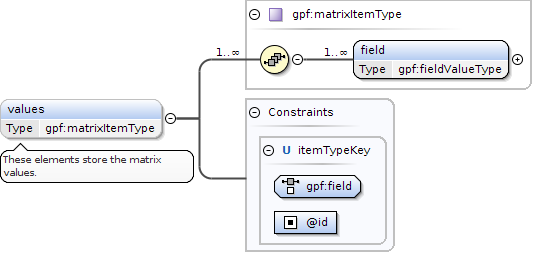
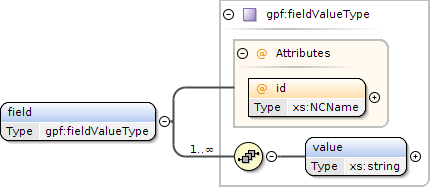
<xs:element type="gpf:matrixItemType" name="values" minOccurs="0" maxOccurs="1"><xs:annotation><xs:documentation>These elements store the matrix values.</xs:documentation></xs:annotation><xs:unique name="itemTypeKey"><xs:selector xpath="gpf:field"/><xs:field xpath="@id"/></xs:unique></xs:element>
Determines if the group container should be visible or not. Often used in conjunction with visibility triggers or extended form javascripts.
Source
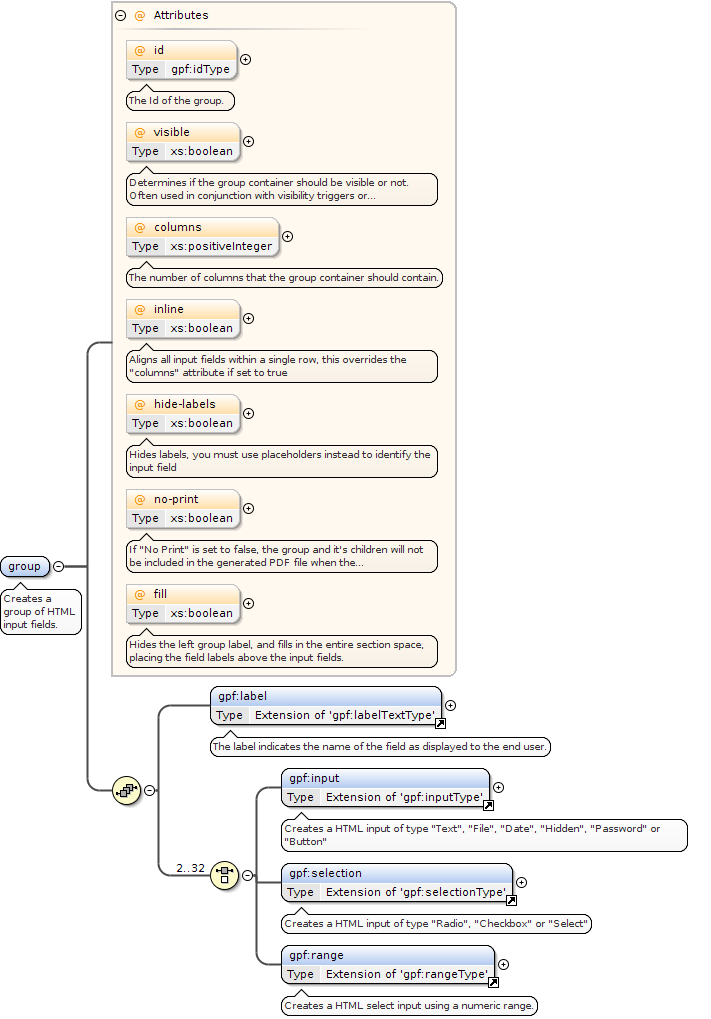
<xs:element name="group"><xs:annotation><xs:documentation>Creates a group of HTML input fields.</xs:documentation></xs:annotation><xs:complexType><xs:sequence><xs:element ref="gpf:label"/><xs:choice minOccurs="2" maxOccurs="32"><xs:element ref="gpf:input"/><xs:element ref="gpf:selection"/><xs:element ref="gpf:range"/></xs:choice></xs:sequence><xs:attribute name="id" type="gpf:idType" use="optional"><xs:annotation><xs:documentation>The Id of the group.</xs:documentation></xs:annotation></xs:attribute><xs:attribute name="visible" type="xs:boolean" use="optional"><xs:annotation><xs:documentation>Determines if the group container should be visible or not. Often used in conjunction with visibility triggers or extended form javascripts.</xs:documentation></xs:annotation></xs:attribute><xs:attribute name="columns" type="xs:positiveInteger" use="optional"><xs:annotation><xs:documentation>The number of columns that the group container should contain.</xs:documentation></xs:annotation></xs:attribute><xs:attribute name="inline" type="xs:boolean" use="optional"><xs:annotation><xs:documentation>Aligns all input fields within a single row, this overrides the "columns" attribute if set to true</xs:documentation></xs:annotation></xs:attribute><xs:attribute name="hide-labels" type="xs:boolean" use="optional"><xs:annotation><xs:documentation>Hides labels, you must use placeholders instead to identify the input field</xs:documentation></xs:annotation></xs:attribute><xs:attribute name="no-print" use="optional" type="xs:boolean"><xs:annotation><xs:documentation>If "No Print" is set to false, the group and it's children will not be included in the generated PDF file when the application is submitted</xs:documentation></xs:annotation></xs:attribute><xs:attribute name="fill" type="xs:boolean" use="optional"><xs:annotation><xs:documentation>Hides the left group label, and fills in the entire section space, placing the field labels above the input fields.</xs:documentation></xs:annotation></xs:attribute></xs:complexType></xs:element>
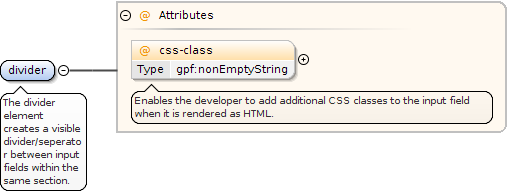
Element gpf:divider
Namespace
http://rep.gopro.net/gpf/xml/schemas/
Annotations
The divider element creates a visible divider/seperator between input fields within the same section.
Enables the developer to add additional CSS classes to the input field when it is rendered as HTML.
Source
<xs:element name="divider"><xs:annotation><xs:documentation>The divider element creates a visible divider/seperator between input fields within the same section.</xs:documentation></xs:annotation><xs:complexType><xs:attribute name="css-class" type="gpf:nonEmptyString"><xs:annotation><xs:documentation>Enables the developer to add additional CSS classes to the input field when it is rendered as HTML.</xs:documentation></xs:annotation></xs:attribute></xs:complexType></xs:element>
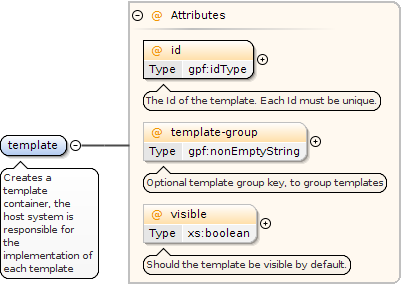
<xs:element name="template"><xs:annotation><xs:documentation>Creates a template container, the host system is responsible for the implementation of each template</xs:documentation></xs:annotation><xs:complexType><xs:attribute name="id" type="gpf:idType" use="required"><xs:annotation><xs:documentation>The Id of the template. Each Id must be unique.</xs:documentation></xs:annotation></xs:attribute><xs:attribute name="template-group" type="gpf:nonEmptyString" use="optional"><xs:annotation><xs:documentation>Optional template group key, to group templates</xs:documentation></xs:annotation></xs:attribute><xs:attribute name="visible" type="xs:boolean" use="optional"><xs:annotation><xs:documentation>Should the template be visible by default.</xs:documentation></xs:annotation></xs:attribute></xs:complexType></xs:element>
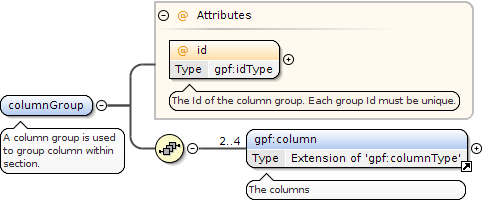
Element gpf:columnGroup
Namespace
http://rep.gopro.net/gpf/xml/schemas/
Annotations
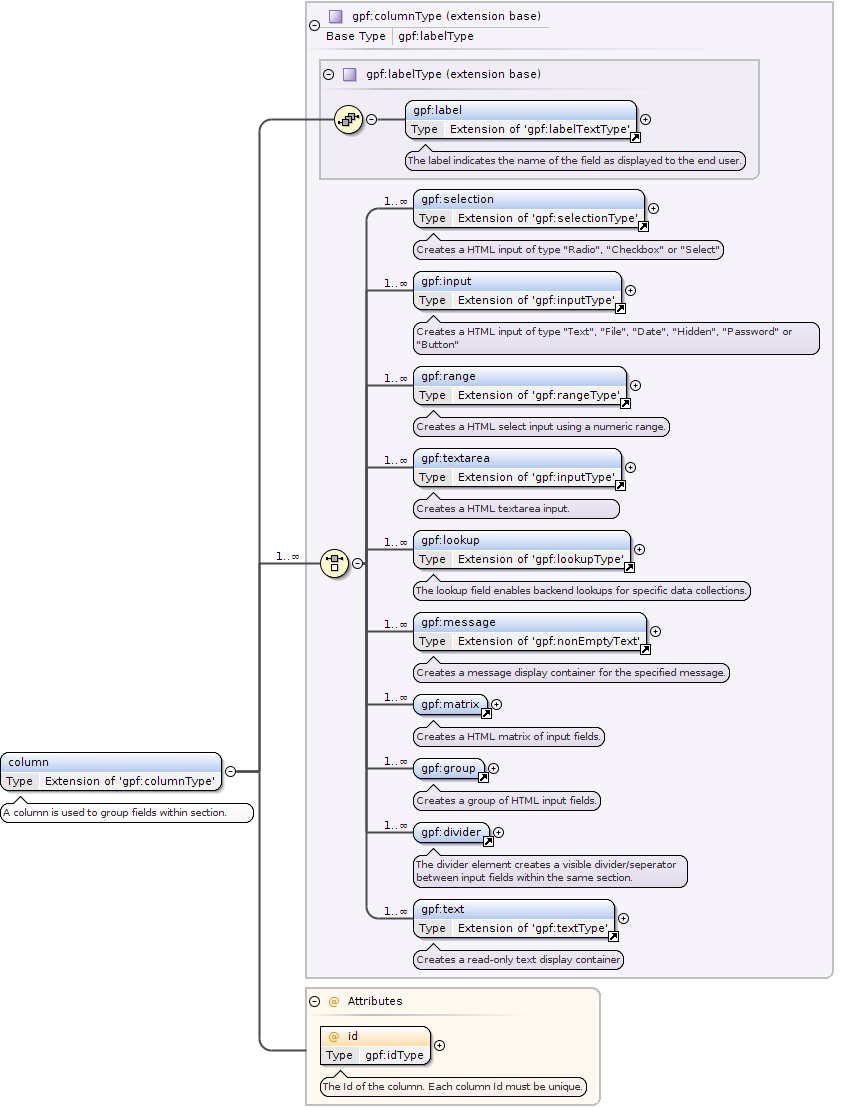
A column group is used to group column within section.
The Id of the column group. Each group Id must be unique.
Source
<xs:element name="columnGroup"><xs:annotation><xs:documentation>A column group is used to group column within section.</xs:documentation></xs:annotation><xs:complexType><xs:sequence><xs:element ref="gpf:column" minOccurs="2" maxOccurs="4"><xs:annotation><xs:documentation>The columns</xs:documentation></xs:annotation></xs:element></xs:sequence><xs:attribute name="id" use="required" type="gpf:idType"><xs:annotation><xs:documentation>The Id of the column group. Each group Id must be unique.</xs:documentation></xs:annotation></xs:attribute></xs:complexType></xs:element>
The Id of the column. Each column Id must be unique.
Source
<xs:element name="column"><xs:annotation><xs:documentation>A column is used to group fields within section.</xs:documentation></xs:annotation><xs:complexType><xs:complexContent><xs:extension base="gpf:columnType"><xs:attribute name="id" use="required" type="gpf:idType"><xs:annotation><xs:documentation>The Id of the column. Each column Id must be unique.</xs:documentation></xs:annotation></xs:attribute></xs:extension></xs:complexContent></xs:complexType></xs:element>
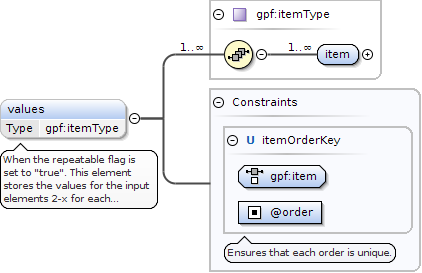
<xs:element type="gpf:itemType" name="values" minOccurs="0" maxOccurs="1"><xs:annotation><xs:documentation>When the repeatable flag is set to "true". This element stores the values for the input elements 2-x for each repeatable section.</xs:documentation></xs:annotation><xs:unique name="itemOrderKey"><xs:annotation><xs:documentation>Ensures that each order is unique.</xs:documentation></xs:annotation><xs:selector xpath="gpf:item"/><xs:field xpath="@order"/></xs:unique></xs:element>
When a field is within a section that has been defined as "repeatable" and the "repeatable-display-mode" is set to "Table",then this attribute can be set to "true" so the field value will not be shown within the rendered table.
Only relevant when type is "Checkbox" or type is "Selection" and "multiple" is set to true,this option makes it required to select at least X options from the list when defined.
Determines if the input field should be visible or not. Often used in conjunction with visibility triggers when visible is set to false.
Source
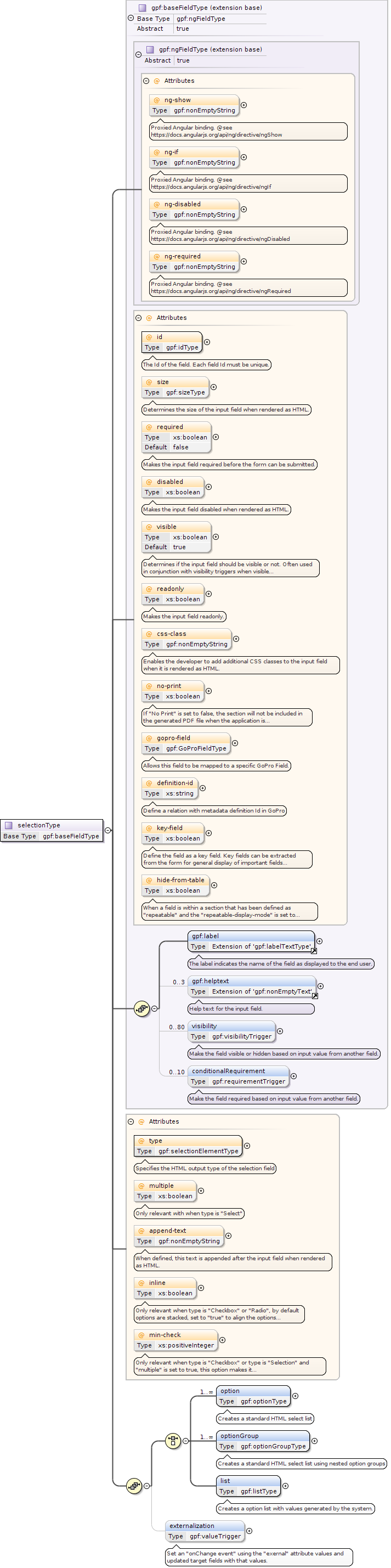
<xs:complexType name="selectionType"><xs:complexContent><xs:extension base="gpf:baseFieldType"><xs:sequence><xs:choice minOccurs="1"><xs:element name="option" type="gpf:optionType" maxOccurs="unbounded"><xs:annotation><xs:documentation>Creates a standard HTML select list</xs:documentation></xs:annotation></xs:element><xs:element name="optionGroup" type="gpf:optionGroupType" maxOccurs="unbounded"><xs:annotation><xs:documentation>Creates a standard HTML select list using nested option groups</xs:documentation></xs:annotation></xs:element><xs:element name="list" type="gpf:listType" maxOccurs="1"><xs:annotation><xs:documentation>Creates a option list with values generated by the system.</xs:documentation></xs:annotation></xs:element></xs:choice><xs:element type="gpf:valueTrigger" name="externalization" minOccurs="0" maxOccurs="1"><xs:annotation><xs:documentation>Set an "onChange event" using the "exernal" attribute values and updated target fields with that values.</xs:documentation></xs:annotation></xs:element></xs:sequence><xs:attribute name="type" type="gpf:selectionElementType" use="required"><xs:annotation><xs:documentation>Specifies the HTML output type of the selection field</xs:documentation></xs:annotation></xs:attribute><xs:attribute name="multiple" type="xs:boolean" use="optional"><xs:annotation><xs:documentation>Only relevant with when type is "Select"</xs:documentation></xs:annotation></xs:attribute><xs:attribute name="append-text" use="optional" type="gpf:nonEmptyString"><xs:annotation><xs:documentation>When defined, this text is appended after the input field when rendered as HTML.</xs:documentation></xs:annotation></xs:attribute><xs:attribute name="inline" type="xs:boolean" use="optional"><xs:annotation><xs:documentation>Only relevant when type is "Checkbox" or "Radio", by default options are stacked, set to "true" to align the options inline</xs:documentation></xs:annotation></xs:attribute><xs:attribute name="min-check" type="xs:positiveInteger" use="optional"><xs:annotation><xs:documentation>Only relevant when type is "Checkbox" or type is "Selection" and "multiple" is set to true, this option makes it required to select at least X options from the list when defined.</xs:documentation></xs:annotation></xs:attribute></xs:extension></xs:complexContent></xs:complexType>
When a field is within a section that has been defined as "repeatable" and the "repeatable-display-mode" is set to "Table",then this attribute can be set to "true" so the field value will not be shown within the rendered table.
Determines if the input field should be visible or not. Often used in conjunction with visibility triggers when visible is set to false.
Source
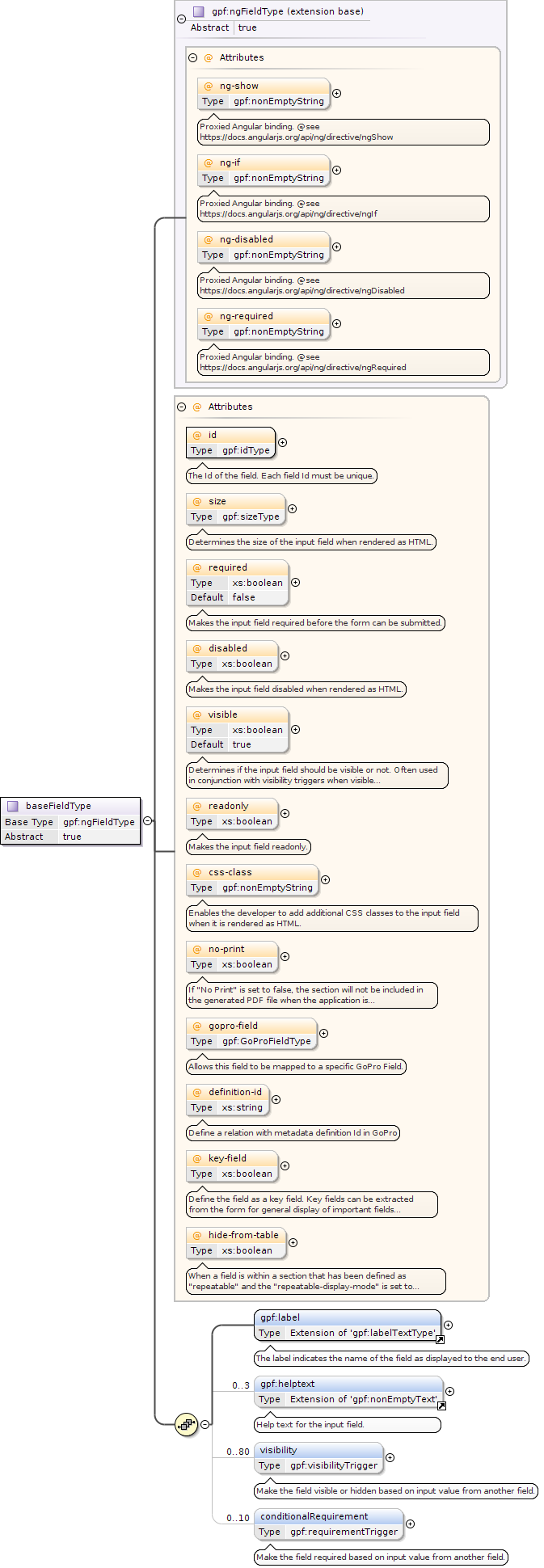
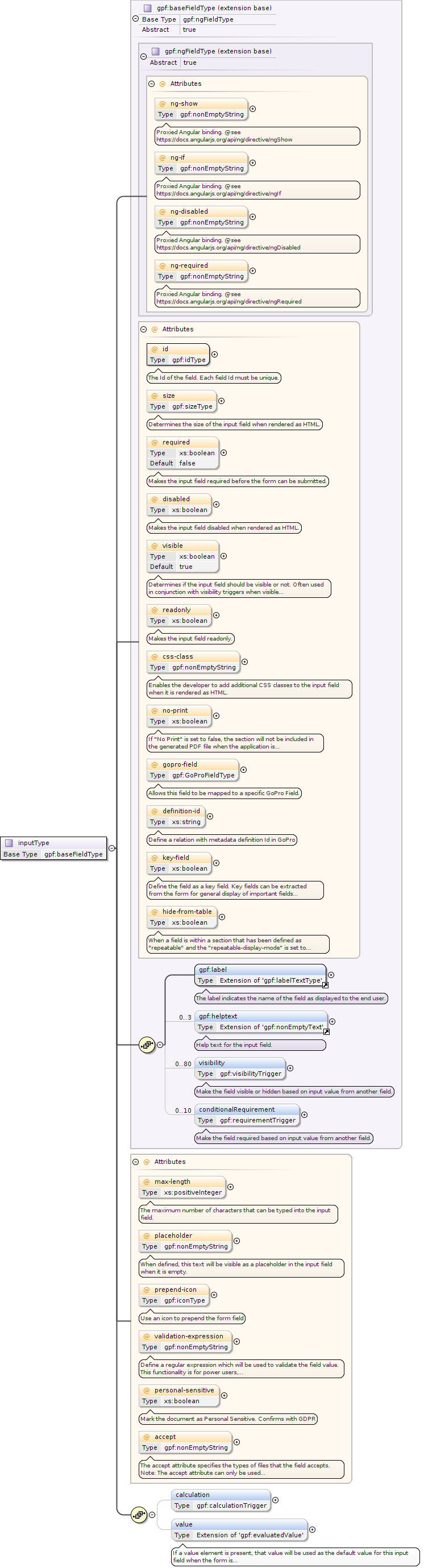
<xs:complexType name="baseFieldType" abstract="true"><xs:complexContent><xs:extension base="gpf:ngFieldType"><xs:sequence><xs:element ref="gpf:label"/><xs:element ref="gpf:helptext" minOccurs="0" maxOccurs="3"/><xs:element type="gpf:visibilityTrigger" name="visibility" minOccurs="0" maxOccurs="80"><xs:annotation><xs:documentation>Make the field visible or hidden based on input value from another field.</xs:documentation></xs:annotation></xs:element><xs:element type="gpf:requirementTrigger" name="conditionalRequirement" minOccurs="0" maxOccurs="10"><xs:annotation><xs:documentation>Make the field required based on input value from another field.</xs:documentation></xs:annotation></xs:element></xs:sequence><xs:attribute name="id" type="gpf:idType" use="required"><xs:annotation><xs:documentation>The Id of the field. Each field Id must be unique.</xs:documentation></xs:annotation></xs:attribute><xs:attribute name="size" type="gpf:sizeType" use="optional"><xs:annotation><xs:documentation>Determines the size of the input field when rendered as HTML.</xs:documentation></xs:annotation></xs:attribute><xs:attribute name="required" type="xs:boolean" use="optional" default="false"><xs:annotation><xs:documentation>Makes the input field required before the form can be submitted.</xs:documentation></xs:annotation></xs:attribute><xs:attribute name="disabled" type="xs:boolean" use="optional"><xs:annotation><xs:documentation>Makes the input field disabled when rendered as HTML.</xs:documentation></xs:annotation></xs:attribute><xs:attribute name="visible" type="xs:boolean" use="optional" default="true"><xs:annotation><xs:documentation>Determines if the input field should be visible or not. Often used in conjunction with visibility triggers when visible is set to false.</xs:documentation></xs:annotation></xs:attribute><xs:attribute name="readonly" type="xs:boolean" use="optional"><xs:annotation><xs:documentation>Makes the input field readonly.</xs:documentation></xs:annotation></xs:attribute><xs:attribute name="css-class" type="gpf:nonEmptyString" use="optional"><xs:annotation><xs:documentation>Enables the developer to add additional CSS classes to the input field when it is rendered as HTML.</xs:documentation></xs:annotation></xs:attribute><xs:attribute name="no-print" use="optional" type="xs:boolean"><xs:annotation><xs:documentation>If "No Print" is set to false, the section will not be included in the generated PDF file when the application is submitted</xs:documentation></xs:annotation></xs:attribute><xs:attribute name="gopro-field" type="gpf:GoProFieldType" use="optional"><xs:annotation><xs:documentation>Allows this field to be mapped to a specific GoPro Field.</xs:documentation></xs:annotation></xs:attribute><xs:attribute name="definition-id" type="xs:string" use="optional"><xs:annotation><xs:documentation>Define a relation with metadata definition Id in GoPro</xs:documentation></xs:annotation></xs:attribute><xs:attribute name="key-field" type="xs:boolean" use="optional"><xs:annotation><xs:documentation>Define the field as a key field. Key fields can be extracted from the form for general display of important fields within the form.</xs:documentation></xs:annotation></xs:attribute><xs:attribute name="hide-from-table" type="xs:boolean" use="optional"><xs:annotation><xs:documentation>When a field is within a section that has been defined as "repeatable" and the "repeatable-display-mode" is set to "Table", then this attribute can be set to "true" so the field value will not be shown within the rendered table.</xs:documentation></xs:annotation></xs:attribute></xs:extension></xs:complexContent></xs:complexType>
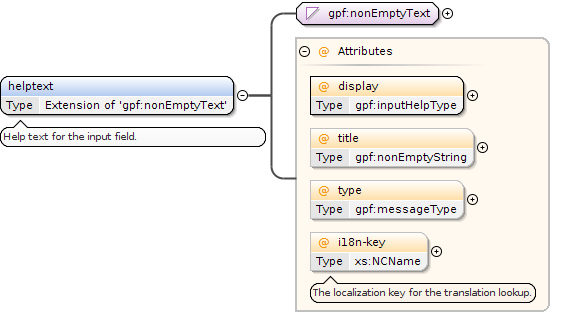
<xs:simpleType name="inputHelpType"><xs:restriction base="xs:string"><xs:enumeration value="Inline"><xs:annotation><xs:documentation>Display the help help inline next to the input field</xs:documentation></xs:annotation></xs:enumeration><xs:enumeration value="Block"><xs:annotation><xs:documentation>Display the help text below the field as a block</xs:documentation></xs:annotation></xs:enumeration><xs:enumeration value="Tooltip"><xs:annotation><xs:documentation>Display the help text as a tootip bubble</xs:documentation></xs:annotation></xs:enumeration><xs:enumeration value="Error"><xs:annotation><xs:documentation>Displays the error text only when the input is invalid or insufficient</xs:documentation></xs:annotation></xs:enumeration></xs:restriction></xs:simpleType>
The input field which will be shown/hidden, when the trigger condition is met.
Source
<xs:complexType name="visibilityTrigger"><xs:annotation><xs:documentation>Visibility triggers allows conditional visibility changes on fields based on input field values.</xs:documentation></xs:annotation><xs:choice><xs:element name="visibleIf" type="gpf:nonEmptyString"><xs:annotation><xs:documentation>The value that is used in conjunction with the "comparison" attribute to enable visibility for the specified "field"</xs:documentation></xs:annotation></xs:element><xs:element name="hiddenIf" type="gpf:nonEmptyString"><xs:annotation><xs:documentation>The value that is used in conjunction with the "comparison" attribute to disable visibility for the specified "field"</xs:documentation></xs:annotation></xs:element></xs:choice><xs:attribute type="xs:NCName" name="field" use="required"><xs:annotation><xs:documentation>The input field which will be shown/hidden, when the trigger condition is met.</xs:documentation></xs:annotation></xs:attribute><xs:attribute type="gpf:comparisonType" name="comparison" use="required"><xs:annotation><xs:documentation>The type of comparison which should be used for the trigger.</xs:documentation></xs:annotation></xs:attribute></xs:complexType>
Requirement trigger can be used to force the input field to be required based on input from other fields within the form.The requirement trigger has not effect if the field is marked as required.
The id of the input field which is acted on, when the trigger condition is met.
Source
<xs:complexType name="requirementTrigger"><xs:annotation><xs:documentation>Requirement trigger can be used to force the input field to be required based on input from other fields within the form. The requirement trigger has not effect if the field is marked as required.</xs:documentation></xs:annotation><xs:sequence minOccurs="0" maxOccurs="1"><xs:element name="value" type="gpf:nonEmptyString"><xs:annotation><xs:documentation>The value which the conditional type should be used for comparison. This field is required if the conditionType is set to "Equals", "Less" or "More"</xs:documentation></xs:annotation></xs:element></xs:sequence><xs:attribute type="xs:NCName" name="field" use="required"><xs:annotation><xs:documentation>The id of the input field which is acted on, when the trigger condition is met.</xs:documentation></xs:annotation></xs:attribute><xs:attribute type="gpf:conditionType" name="condition" use="required"><xs:annotation><xs:documentation>The condition to be met that will force the field to be required.</xs:documentation></xs:annotation></xs:attribute></xs:complexType>
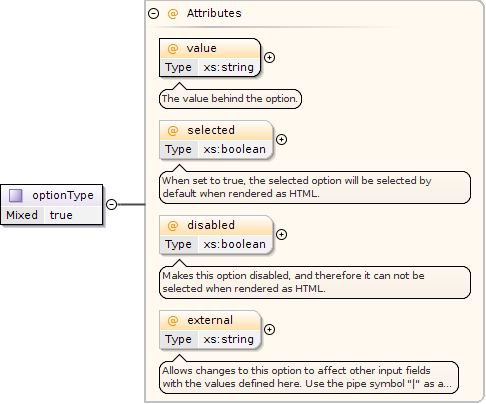
Allows changes to this option to affect other input fields with the values defined here. Use the pipe symbol "|" as a delimiter for multiple values.Use the externalTrigger directive to choose which fields should be the target fields for the specified data.
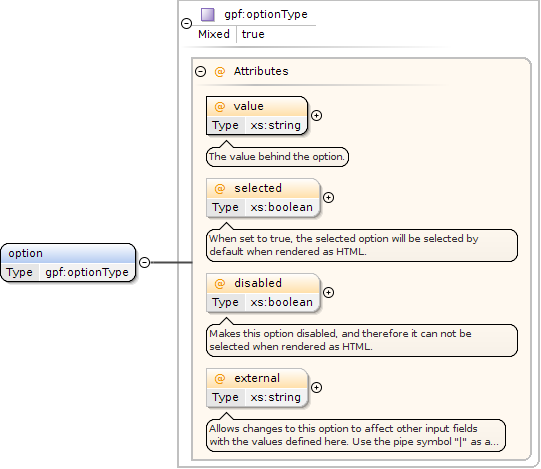
<xs:complexType name="optionType" mixed="true"><xs:attribute name="value" use="required" type="xs:string"><xs:annotation><xs:documentation>The value behind the option.</xs:documentation></xs:annotation></xs:attribute><xs:attribute name="selected" use="optional" type="xs:boolean"><xs:annotation><xs:documentation>When set to true, the selected option will be selected by default when rendered as HTML.</xs:documentation></xs:annotation></xs:attribute><xs:attribute name="disabled" use="optional" type="xs:boolean"><xs:annotation><xs:documentation>Makes this option disabled, and therefore it can not be selected when rendered as HTML.</xs:documentation></xs:annotation></xs:attribute><xs:attribute name="external" use="optional" type="xs:string"><xs:annotation><xs:documentation>Allows changes to this option to affect other input fields with the values defined here. Use the pipe symbol "|" as a delimiter for multiple values. Use the externalTrigger directive to choose which fields should be the target fields for the specified data.</xs:documentation></xs:annotation></xs:attribute></xs:complexType>
If set to "true", the list will be alphabetically sorted.
Source
<xs:complexType name="listType"><xs:simpleContent><xs:extension base="gpf:staticListType"><xs:attribute name="selected" use="optional" type="xs:string"><xs:annotation><xs:documentation>The selected value from the list</xs:documentation></xs:annotation></xs:attribute><xs:attribute name="sort" use="optional" type="xs:boolean"><xs:annotation><xs:documentation>If set to "true", the list will be alphabetically sorted.</xs:documentation></xs:annotation></xs:attribute></xs:extension></xs:simpleContent></xs:complexType>
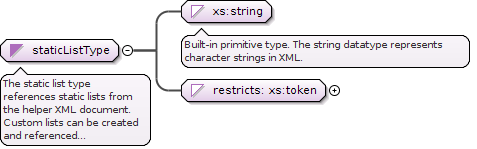
Simple Type gpf:staticListType
Namespace
http://rep.gopro.net/gpf/xml/schemas/
Annotations
The static list type references static lists from the helper XML document.Custom lists can be created and referenced through this element.
<xs:simpleType name="staticListType"><xs:annotation><xs:documentation>The static list type references static lists from the helper XML document. Custom lists can be created and referenced through this element.</xs:documentation></xs:annotation><xs:union memberTypes="xs:string"><xs:simpleType><xs:restriction base="xs:token"><xs:enumeration value="CountryList"><xs:annotation><xs:documentation>Generates a static list with all the countries in the world.</xs:documentation></xs:annotation></xs:enumeration><xs:enumeration value="LanguageList"><xs:annotation><xs:documentation>Generates a static list with all the languages in the world.</xs:documentation></xs:annotation></xs:enumeration><xs:enumeration value="CurrencyList"><xs:annotation><xs:documentation>Generates a static list with all the worlds currencies.</xs:documentation></xs:annotation></xs:enumeration><xs:enumeration value="StateList"><xs:annotation><xs:documentation>Generates a static list with all the states for the current country.</xs:documentation></xs:annotation></xs:enumeration><xs:enumeration value="MonthList"><xs:annotation><xs:documentation>Generates a static list with the names of the calendar months.</xs:documentation></xs:annotation></xs:enumeration></xs:restriction></xs:simpleType></xs:union></xs:simpleType>
Complex Type gpf:valueTrigger
Namespace
http://rep.gopro.net/gpf/xml/schemas/
Annotations
Value triggers are used in conjunction with the "external" attribute. It takes data from the "external" attribute and sets it as a value in the target field.
<xs:complexType name="valueTrigger"><xs:annotation><xs:documentation>Value triggers are used in conjunction with the "external" attribute. It takes data from the "external" attribute and sets it as a value in the target field.</xs:documentation></xs:annotation><xs:sequence minOccurs="1" maxOccurs="unbounded"><xs:element name="field" type="xs:NCName"><xs:annotation><xs:documentation>The fields that that will be used to set the values on based on the "external" attribute.</xs:documentation></xs:annotation></xs:element></xs:sequence></xs:complexType>
The accept attribute specifies the types of files that the field accepts.Note: The accept attribute can only be used with type="file"Use same syntax as the HTML5 accept attribute.
When a field is within a section that has been defined as "repeatable" and the "repeatable-display-mode" is set to "Table",then this attribute can be set to "true" so the field value will not be shown within the rendered table.
Define a regular expression which will be used to validate the field value. This functionality is for power users, invalid expressions might end up breaking the form.
Determines if the input field should be visible or not. Often used in conjunction with visibility triggers when visible is set to false.
Source
<xs:complexType name="inputType"><xs:complexContent><xs:extension base="gpf:baseFieldType"><xs:sequence><xs:element type="gpf:calculationTrigger" name="calculation" minOccurs="0" maxOccurs="1"/><xs:element name="value" minOccurs="0" maxOccurs="1"><xs:annotation><xs:documentation>If a value element is present, that value will be used as the default value for this input field when the form is loaded for the first time.</xs:documentation></xs:annotation><xs:complexType><xs:simpleContent><xs:extension base="gpf:evaluatedValue"/></xs:simpleContent></xs:complexType></xs:element></xs:sequence><xs:attribute name="max-length" type="xs:positiveInteger" use="optional"><xs:annotation><xs:documentation>The maximum number of characters that can be typed into the input field.</xs:documentation></xs:annotation></xs:attribute><xs:attribute name="placeholder" type="gpf:nonEmptyString" use="optional"><xs:annotation><xs:documentation>When defined, this text will be visible as a placeholder in the input field when it is empty.</xs:documentation></xs:annotation></xs:attribute><xs:attribute name="prepend-icon" type="gpf:iconType" use="optional"><xs:annotation><xs:documentation>Use an icon to prepend the form field</xs:documentation></xs:annotation></xs:attribute><xs:attribute name="validation-expression" type="gpf:nonEmptyString" use="optional"><xs:annotation><xs:documentation>Define a regular expression which will be used to validate the field value. This functionality is for power users, invalid expressions might end up breaking the form.</xs:documentation></xs:annotation></xs:attribute><xs:attribute name="personal-sensitive" use="optional" type="xs:boolean"><xs:annotation><xs:documentation>Mark the document as Personal Sensitive. Confirms with GDPR</xs:documentation></xs:annotation></xs:attribute><xs:attribute name="accept" use="optional" type="gpf:nonEmptyString"><xs:annotation><xs:documentation>The accept attribute specifies the types of files that the field accepts. Note: The accept attribute can only be used with type="file" Use same syntax as the HTML5 accept attribute.</xs:documentation></xs:annotation></xs:attribute></xs:extension></xs:complexContent></xs:complexType>
Complex Type gpf:calculationTrigger
Namespace
http://rep.gopro.net/gpf/xml/schemas/
Annotations
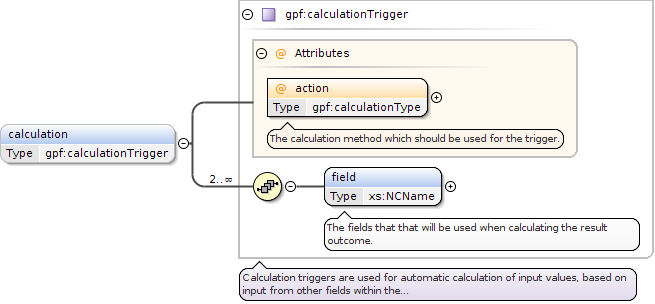
Calculation triggers are used for automatic calculation of input values, based on input from other fields within the form.
The calculation method which should be used for the trigger.
Source
<xs:complexType name="calculationTrigger"><xs:annotation><xs:documentation>Calculation triggers are used for automatic calculation of input values, based on input from other fields within the form.</xs:documentation></xs:annotation><xs:sequence minOccurs="2" maxOccurs="unbounded"><xs:element name="field" type="xs:NCName"><xs:annotation><xs:documentation>The fields that that will be used when calculating the result outcome.</xs:documentation></xs:annotation></xs:element></xs:sequence><xs:attribute name="action" use="required" type="gpf:calculationType"><xs:annotation><xs:documentation>The calculation method which should be used for the trigger.</xs:documentation></xs:annotation></xs:attribute></xs:complexType>
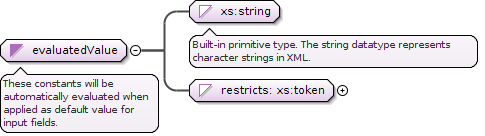
<xs:simpleType name="evaluatedValue"><xs:annotation><xs:documentation>These constants will be automatically evaluated when applied as default value for input fields.</xs:documentation></xs:annotation><xs:union memberTypes="xs:string"><xs:simpleType><xs:restriction base="xs:token"><xs:enumeration value="[User.Username]"><xs:annotation><xs:documentation>Evaluates to the username</xs:documentation></xs:annotation></xs:enumeration><xs:enumeration value="[User.Fullname]"><xs:annotation><xs:documentation>Evaluates to the current user's full name</xs:documentation></xs:annotation></xs:enumeration><xs:enumeration value="[User.Firstname]"><xs:annotation><xs:documentation>Evaluates to the current user's first name</xs:documentation></xs:annotation></xs:enumeration><xs:enumeration value="[User.Middlename]"><xs:annotation><xs:documentation>Evaluates to the current user's midde names if any</xs:documentation></xs:annotation></xs:enumeration><xs:enumeration value="[User.Lastname]"><xs:annotation><xs:documentation>Evaluates to the current user's last name</xs:documentation></xs:annotation></xs:enumeration><xs:enumeration value="[User.Initials]"><xs:annotation><xs:documentation>Evaluates to the current user's initials</xs:documentation></xs:annotation></xs:enumeration><xs:enumeration value="[User.Familynumber]"><xs:annotation><xs:documentation>Evaluates to the current user's family number</xs:documentation></xs:annotation></xs:enumeration><xs:enumeration value="[User.Ssn]"><xs:annotation><xs:documentation>Evaluates to the current user's social security number</xs:documentation></xs:annotation></xs:enumeration><xs:enumeration value="[User.Email]"><xs:annotation><xs:documentation>Evaluates to the current user's email</xs:documentation></xs:annotation></xs:enumeration><xs:enumeration value="[User.PhoneNumber]"><xs:annotation><xs:documentation>Evaluates to the current user's phone number</xs:documentation></xs:annotation></xs:enumeration><xs:enumeration value="[User.MobilePhoneNumber]"><xs:annotation><xs:documentation>Evaluates to the current user's mobile phone number</xs:documentation></xs:annotation></xs:enumeration><xs:enumeration value="[User.Language]"><xs:annotation><xs:documentation>Evaluates to the current user's selected language</xs:documentation></xs:annotation></xs:enumeration><xs:enumeration value="[User.Address]"><xs:annotation><xs:documentation>Evaluates to the current user's address</xs:documentation></xs:annotation></xs:enumeration><xs:enumeration value="[User.Address.Streetname]"><xs:annotation><xs:documentation>Evaluates to the current user's street name</xs:documentation></xs:annotation></xs:enumeration><xs:enumeration value="[User.Address.City]"><xs:annotation><xs:documentation>Evaluates to the current user's city</xs:documentation></xs:annotation></xs:enumeration><xs:enumeration value="[User.Address.Country]"><xs:annotation><xs:documentation>Evaluates to the current user's country</xs:documentation></xs:annotation></xs:enumeration><xs:enumeration value="[User.Address.State]"><xs:annotation><xs:documentation>Evaluates to the current user's state</xs:documentation></xs:annotation></xs:enumeration><xs:enumeration value="[User.Address.Postcode]"><xs:annotation><xs:documentation>Evaluates to the current user's postcode</xs:documentation></xs:annotation></xs:enumeration><xs:enumeration value="[Company.Name]"><xs:annotation><xs:documentation>Evaluates to the current user's company name</xs:documentation></xs:annotation></xs:enumeration><xs:enumeration value="[Company.Address]"><xs:annotation><xs:documentation>Evaluates to the current user's company address</xs:documentation></xs:annotation></xs:enumeration><xs:enumeration value="[Company.Address.Streetname]"><xs:annotation><xs:documentation>Evaluates to the current user's company address street name</xs:documentation></xs:annotation></xs:enumeration><xs:enumeration value="[Company.Address.City]"><xs:annotation><xs:documentation>Evaluates to the current user's company city</xs:documentation></xs:annotation></xs:enumeration><xs:enumeration value="[Company.Address.Postcode]"><xs:annotation><xs:documentation>Evaluates to the current user's company postcode</xs:documentation></xs:annotation></xs:enumeration><xs:enumeration value="[Company.Address.Country]"><xs:annotation><xs:documentation>Evaluates to the current user's country</xs:documentation></xs:annotation></xs:enumeration><xs:enumeration value="[Form.Subject]"><xs:annotation><xs:documentation>Evaluates to the form's subject as defined in the Admin UI</xs:documentation></xs:annotation></xs:enumeration><xs:enumeration value="[Form.Category]"><xs:annotation><xs:documentation>Evaluates to the form's category as defined in the Admin UI</xs:documentation></xs:annotation></xs:enumeration><xs:enumeration value="[Form.Description]"><xs:annotation><xs:documentation>Evaluates to the form's description as defined in the Admin UI</xs:documentation></xs:annotation></xs:enumeration></xs:restriction></xs:simpleType></xs:union></xs:simpleType>
When a field is within a section that has been defined as "repeatable" and the "repeatable-display-mode" is set to "Table",then this attribute can be set to "true" so the field value will not be shown within the rendered table.
Determines if the input field should be visible or not. Often used in conjunction with visibility triggers when visible is set to false.
Source
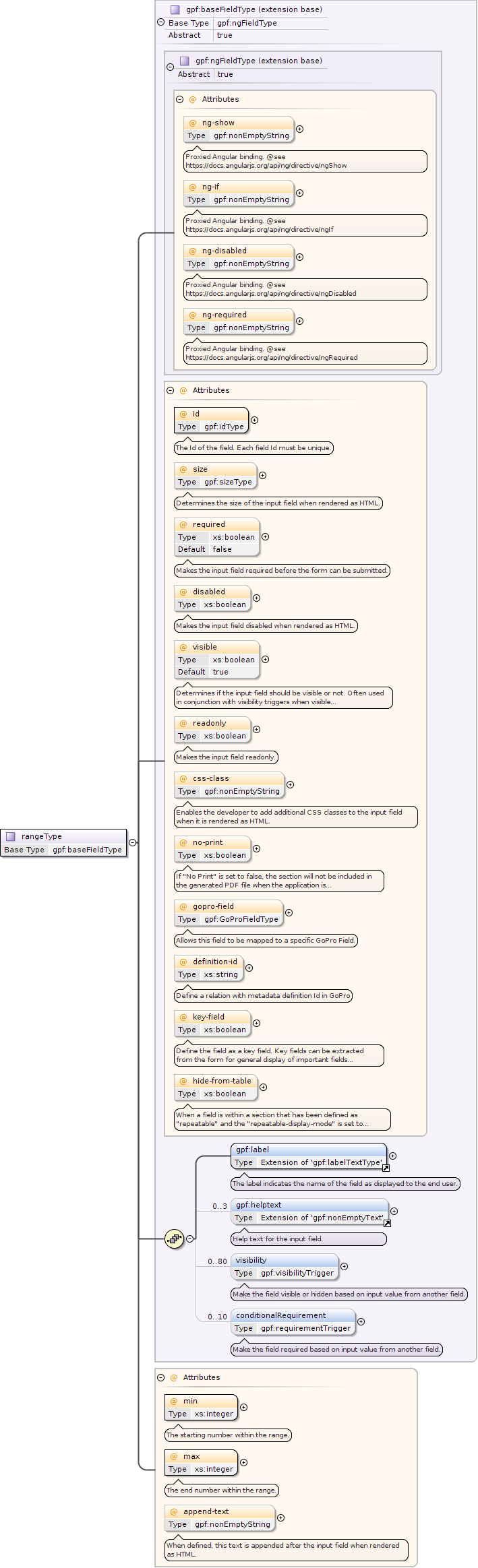
<xs:complexType name="rangeType"><xs:complexContent><xs:extension base="gpf:baseFieldType"><xs:attribute name="min" use="required" type="xs:integer"><xs:annotation><xs:documentation>The starting number within the range.</xs:documentation></xs:annotation></xs:attribute><xs:attribute name="max" use="required" type="xs:integer"><xs:annotation><xs:documentation>The end number within the range.</xs:documentation></xs:annotation></xs:attribute><xs:attribute name="append-text" use="optional" type="gpf:nonEmptyString"><xs:annotation><xs:documentation>When defined, this text is appended after the input field when rendered as HTML.</xs:documentation></xs:annotation></xs:attribute></xs:extension></xs:complexContent></xs:complexType>
When a field is within a section that has been defined as "repeatable" and the "repeatable-display-mode" is set to "Table",then this attribute can be set to "true" so the field value will not be shown within the rendered table.
Determines if the input field should be visible or not. Often used in conjunction with visibility triggers when visible is set to false.
Source
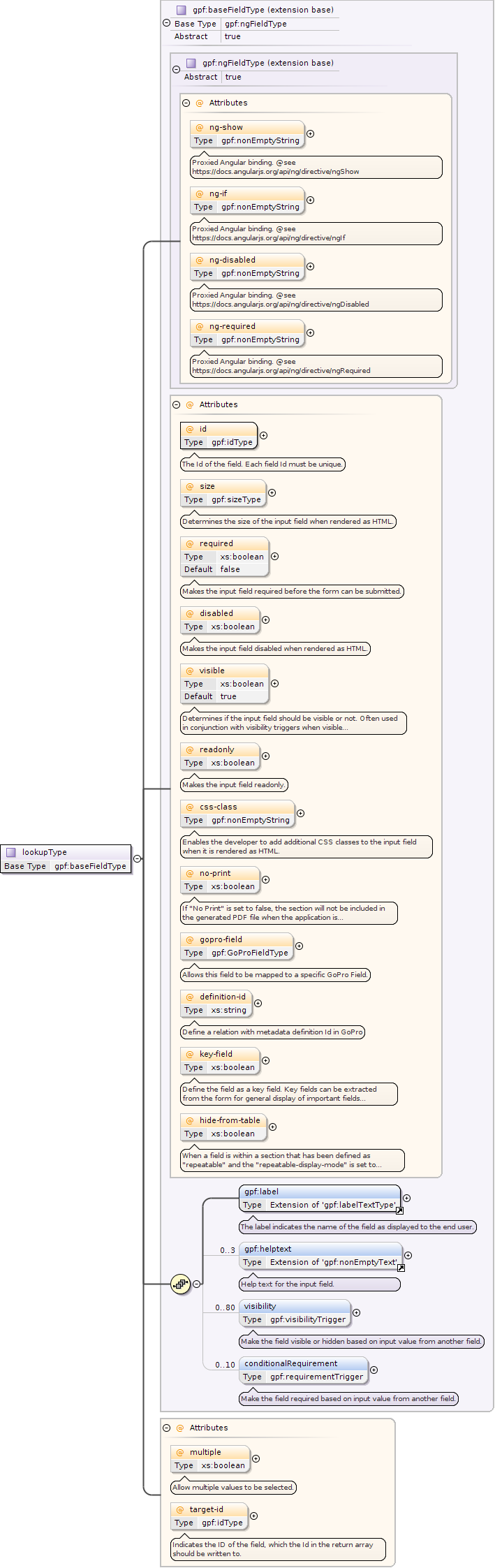
<xs:complexType name="lookupType"><xs:complexContent><xs:extension base="gpf:baseFieldType"><xs:attribute name="multiple" use="optional" type="xs:boolean"><xs:annotation><xs:documentation>Allow multiple values to be selected.</xs:documentation></xs:annotation></xs:attribute><xs:attribute name="target-id" use="optional" type="gpf:idType"><xs:annotation><xs:documentation>Indicates the ID of the field, which the Id in the return array should be written to.</xs:documentation></xs:annotation></xs:attribute></xs:extension></xs:complexContent></xs:complexType>
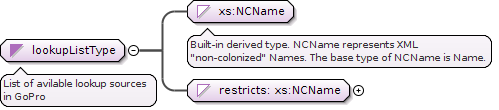
<xs:simpleType name="lookupListType"><xs:annotation><xs:documentation xml:lang="en">List of avilable lookup sources in GoPro</xs:documentation></xs:annotation><xs:union memberTypes="xs:NCName"><xs:simpleType><xs:restriction base="xs:NCName"><xs:enumeration value="Clients"/><xs:enumeration value="Contacts"/><xs:enumeration value="Companies"/><xs:enumeration value="Individuals"/><xs:enumeration value="Users"/><xs:enumeration value="Category"/><xs:enumeration value="UserGroups"><xs:annotation><xs:documentation>Only available for GoPro Foris</xs:documentation></xs:annotation></xs:enumeration><xs:enumeration value="NationalCompany"><xs:annotation><xs:documentation>Only available for GoPro Foris</xs:documentation></xs:annotation></xs:enumeration><xs:enumeration value="NationalIndividual"><xs:annotation><xs:documentation>Only available for GoPro Foris</xs:documentation></xs:annotation></xs:enumeration></xs:restriction></xs:simpleType></xs:union></xs:simpleType>
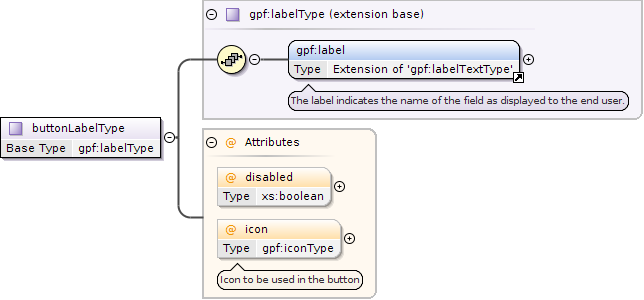
<xs:complexType name="buttonLabelType"><xs:complexContent><xs:extension base="gpf:labelType"><xs:attribute type="xs:boolean" name="disabled" use="optional"/><xs:attribute type="gpf:iconType" name="icon" use="optional"><xs:annotation><xs:documentation>Icon to be used in the button</xs:documentation></xs:annotation></xs:attribute></xs:extension></xs:complexContent></xs:complexType>
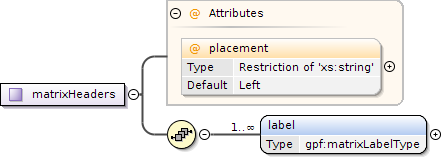
<xs:complexType name="matrixHeaders"><xs:sequence><xs:element minOccurs="1" maxOccurs="unbounded" name="label" type="gpf:matrixLabelType"/></xs:sequence><xs:attribute name="placement" use="optional" default="Left"><xs:simpleType><xs:restriction base="xs:string"><xs:enumeration value="Left"><xs:annotation><xs:documentation>Headers will be place on the left</xs:documentation></xs:annotation></xs:enumeration><xs:enumeration value="Top"><xs:annotation><xs:documentation>Headers will be placed on Top</xs:documentation></xs:annotation></xs:enumeration></xs:restriction></xs:simpleType></xs:attribute></xs:complexType>
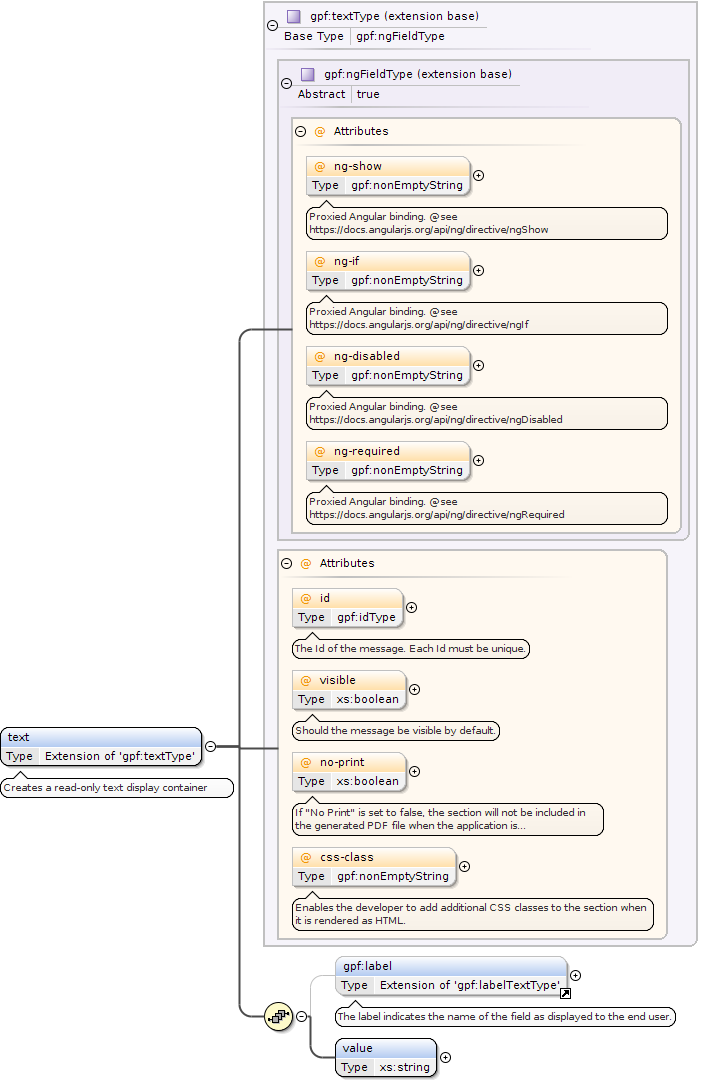
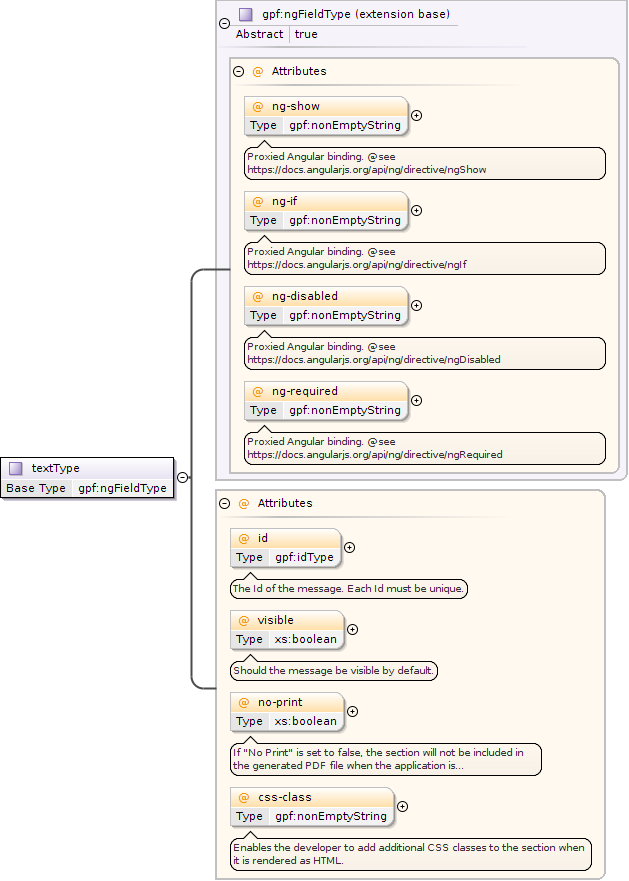
<xs:complexType name="textType"><xs:complexContent><xs:extension base="gpf:ngFieldType"><xs:attribute name="id" type="gpf:idType" use="optional"><xs:annotation><xs:documentation>The Id of the message. Each Id must be unique.</xs:documentation></xs:annotation></xs:attribute><xs:attribute name="visible" type="xs:boolean" use="optional"><xs:annotation><xs:documentation>Should the message be visible by default.</xs:documentation></xs:annotation></xs:attribute><xs:attribute name="no-print" use="optional" type="xs:boolean"><xs:annotation><xs:documentation>If "No Print" is set to false, the section will not be included in the generated PDF file when the application is submitted</xs:documentation></xs:annotation></xs:attribute><xs:attribute name="css-class" type="gpf:nonEmptyString" use="optional"><xs:annotation><xs:documentation>Enables the developer to add additional CSS classes to the section when it is rendered as HTML.</xs:documentation></xs:annotation></xs:attribute></xs:extension></xs:complexContent></xs:complexType>
<xs:attribute name="id" use="optional" type="gpf:idType"><xs:annotation><xs:documentation>The Id of the label. Each label Id must be unique.</xs:documentation></xs:annotation></xs:attribute>
<xs:attribute name="i18n-key" use="optional" type="xs:NCName"><xs:annotation><xs:documentation>The localization key for the translation lookup.</xs:documentation></xs:annotation></xs:attribute>
<xs:attribute name="visible" use="optional" type="xs:boolean"><xs:annotation><xs:documentation>Should the label be visible or not ?</xs:documentation></xs:annotation></xs:attribute>
<xs:attribute name="id" use="optional" type="gpf:idType"><xs:annotation><xs:documentation>The Id of the label. Each label Id must be unique.</xs:documentation></xs:annotation></xs:attribute>
<xs:attribute name="i18n-key" use="optional" type="xs:NCName"><xs:annotation><xs:documentation>The localization key for the translation lookup.</xs:documentation></xs:annotation></xs:attribute>
<xs:attribute name="visible" use="optional" type="xs:boolean"><xs:annotation><xs:documentation>Should the label be visible or not ?</xs:documentation></xs:annotation></xs:attribute>
<xs:attribute name="i18n-key" use="optional" type="xs:NCName"><xs:annotation><xs:documentation>The localization key for the translation lookup.</xs:documentation></xs:annotation></xs:attribute>
<xs:attribute type="xs:NCName" name="field" use="required"><xs:annotation><xs:documentation>The input field which will be shown/hidden, when the trigger condition is met.</xs:documentation></xs:annotation></xs:attribute>
<xs:attribute type="gpf:comparisonType" name="comparison" use="required"><xs:annotation><xs:documentation>The type of comparison which should be used for the trigger.</xs:documentation></xs:annotation></xs:attribute>
<xs:attribute type="xs:NCName" name="field" use="required"><xs:annotation><xs:documentation>The id of the input field which is acted on, when the trigger condition is met.</xs:documentation></xs:annotation></xs:attribute>
<xs:attribute type="gpf:conditionType" name="condition" use="required"><xs:annotation><xs:documentation>The condition to be met that will force the field to be required.</xs:documentation></xs:annotation></xs:attribute>
<xs:attribute name="id" type="gpf:idType" use="required"><xs:annotation><xs:documentation>The Id of the field. Each field Id must be unique.</xs:documentation></xs:annotation></xs:attribute>
<xs:attribute name="size" type="gpf:sizeType" use="optional"><xs:annotation><xs:documentation>Determines the size of the input field when rendered as HTML.</xs:documentation></xs:annotation></xs:attribute>
<xs:attribute name="required" type="xs:boolean" use="optional" default="false"><xs:annotation><xs:documentation>Makes the input field required before the form can be submitted.</xs:documentation></xs:annotation></xs:attribute>
<xs:attribute name="disabled" type="xs:boolean" use="optional"><xs:annotation><xs:documentation>Makes the input field disabled when rendered as HTML.</xs:documentation></xs:annotation></xs:attribute>
<xs:attribute name="visible" type="xs:boolean" use="optional" default="true"><xs:annotation><xs:documentation>Determines if the input field should be visible or not. Often used in conjunction with visibility triggers when visible is set to false.</xs:documentation></xs:annotation></xs:attribute>
<xs:attribute name="readonly" type="xs:boolean" use="optional"><xs:annotation><xs:documentation>Makes the input field readonly.</xs:documentation></xs:annotation></xs:attribute>
<xs:attribute name="css-class" type="gpf:nonEmptyString" use="optional"><xs:annotation><xs:documentation>Enables the developer to add additional CSS classes to the input field when it is rendered as HTML.</xs:documentation></xs:annotation></xs:attribute>
<xs:attribute name="no-print" use="optional" type="xs:boolean"><xs:annotation><xs:documentation>If "No Print" is set to false, the section will not be included in the generated PDF file when the application is submitted</xs:documentation></xs:annotation></xs:attribute>
<xs:attribute name="gopro-field" type="gpf:GoProFieldType" use="optional"><xs:annotation><xs:documentation>Allows this field to be mapped to a specific GoPro Field.</xs:documentation></xs:annotation></xs:attribute>
<xs:attribute name="definition-id" type="xs:string" use="optional"><xs:annotation><xs:documentation>Define a relation with metadata definition Id in GoPro</xs:documentation></xs:annotation></xs:attribute>
<xs:attribute name="key-field" type="xs:boolean" use="optional"><xs:annotation><xs:documentation>Define the field as a key field. Key fields can be extracted from the form for general display of important fields within the form.</xs:documentation></xs:annotation></xs:attribute>
When a field is within a section that has been defined as "repeatable" and the "repeatable-display-mode" is set to "Table",then this attribute can be set to "true" so the field value will not be shown within the rendered table.
<xs:attribute name="hide-from-table" type="xs:boolean" use="optional"><xs:annotation><xs:documentation>When a field is within a section that has been defined as "repeatable" and the "repeatable-display-mode" is set to "Table", then this attribute can be set to "true" so the field value will not be shown within the rendered table.</xs:documentation></xs:annotation></xs:attribute>
<xs:attribute name="value" use="required" type="xs:string"><xs:annotation><xs:documentation>The value behind the option.</xs:documentation></xs:annotation></xs:attribute>
<xs:attribute name="selected" use="optional" type="xs:boolean"><xs:annotation><xs:documentation>When set to true, the selected option will be selected by default when rendered as HTML.</xs:documentation></xs:annotation></xs:attribute>
<xs:attribute name="disabled" use="optional" type="xs:boolean"><xs:annotation><xs:documentation>Makes this option disabled, and therefore it can not be selected when rendered as HTML.</xs:documentation></xs:annotation></xs:attribute>
Allows changes to this option to affect other input fields with the values defined here. Use the pipe symbol "|" as a delimiter for multiple values.Use the externalTrigger directive to choose which fields should be the target fields for the specified data.
<xs:attribute name="external" use="optional" type="xs:string"><xs:annotation><xs:documentation>Allows changes to this option to affect other input fields with the values defined here. Use the pipe symbol "|" as a delimiter for multiple values. Use the externalTrigger directive to choose which fields should be the target fields for the specified data.</xs:documentation></xs:annotation></xs:attribute>
<xs:attribute name="selected" use="optional" type="xs:string"><xs:annotation><xs:documentation>The selected value from the list</xs:documentation></xs:annotation></xs:attribute>
<xs:attribute name="sort" use="optional" type="xs:boolean"><xs:annotation><xs:documentation>If set to "true", the list will be alphabetically sorted.</xs:documentation></xs:annotation></xs:attribute>
<xs:attribute name="type" type="gpf:selectionElementType" use="required"><xs:annotation><xs:documentation>Specifies the HTML output type of the selection field</xs:documentation></xs:annotation></xs:attribute>
<xs:attribute name="multiple" type="xs:boolean" use="optional"><xs:annotation><xs:documentation>Only relevant with when type is "Select"</xs:documentation></xs:annotation></xs:attribute>
<xs:attribute name="append-text" use="optional" type="gpf:nonEmptyString"><xs:annotation><xs:documentation>When defined, this text is appended after the input field when rendered as HTML.</xs:documentation></xs:annotation></xs:attribute>
<xs:attribute name="inline" type="xs:boolean" use="optional"><xs:annotation><xs:documentation>Only relevant when type is "Checkbox" or "Radio", by default options are stacked, set to "true" to align the options inline</xs:documentation></xs:annotation></xs:attribute>
Only relevant when type is "Checkbox" or type is "Selection" and "multiple" is set to true,this option makes it required to select at least X options from the list when defined.
<xs:attribute name="min-check" type="xs:positiveInteger" use="optional"><xs:annotation><xs:documentation>Only relevant when type is "Checkbox" or type is "Selection" and "multiple" is set to true, this option makes it required to select at least X options from the list when defined.</xs:documentation></xs:annotation></xs:attribute>
<xs:attribute name="action" use="required" type="gpf:calculationType"><xs:annotation><xs:documentation>The calculation method which should be used for the trigger.</xs:documentation></xs:annotation></xs:attribute>
<xs:attribute name="max-length" type="xs:positiveInteger" use="optional"><xs:annotation><xs:documentation>The maximum number of characters that can be typed into the input field.</xs:documentation></xs:annotation></xs:attribute>
<xs:attribute name="placeholder" type="gpf:nonEmptyString" use="optional"><xs:annotation><xs:documentation>When defined, this text will be visible as a placeholder in the input field when it is empty.</xs:documentation></xs:annotation></xs:attribute>
<xs:attribute name="prepend-icon" type="gpf:iconType" use="optional"><xs:annotation><xs:documentation>Use an icon to prepend the form field</xs:documentation></xs:annotation></xs:attribute>
Define a regular expression which will be used to validate the field value. This functionality is for power users, invalid expressions might end up breaking the form.
<xs:attribute name="validation-expression" type="gpf:nonEmptyString" use="optional"><xs:annotation><xs:documentation>Define a regular expression which will be used to validate the field value. This functionality is for power users, invalid expressions might end up breaking the form.</xs:documentation></xs:annotation></xs:attribute>
<xs:attribute name="personal-sensitive" use="optional" type="xs:boolean"><xs:annotation><xs:documentation>Mark the document as Personal Sensitive. Confirms with GDPR</xs:documentation></xs:annotation></xs:attribute>
The accept attribute specifies the types of files that the field accepts.Note: The accept attribute can only be used with type="file"Use same syntax as the HTML5 accept attribute.
<xs:attribute name="accept" use="optional" type="gpf:nonEmptyString"><xs:annotation><xs:documentation>The accept attribute specifies the types of files that the field accepts. Note: The accept attribute can only be used with type="file" Use same syntax as the HTML5 accept attribute.</xs:documentation></xs:annotation></xs:attribute>
<xs:attribute name="type" type="gpf:inputElementType" use="required"><xs:annotation><xs:documentation>Defines the input type for the rendered field.</xs:documentation></xs:annotation></xs:attribute>
Defines an input restriction / validation on the field value, based on the rule selected. This also has affect on how the MetaValueType is set in GoPro
Type
restriction of xs:string
Properties
use
optional
Facets
enumeration
text
Sets GoPro MetaValueType to MetaValueType.STRING
enumeration
number
Restrict input to a number value, without fraction point. Sets GoPro MetaValueType to MetaValueType.INT
enumeration
email
UI checks for valid email. Sets GoPro MetaValueType to MetaValueType.STRING
enumeration
url
UI checks for valid URL. Sets GoPro MetaValueType to MetaValueType.STRING
enumeration
ssn-is
UI checks for valid SSN. Sets GoPro MetaValueType to MetaValueType.STRING
enumeration
boolean
Boolean value, (0 or 1) and (true and false) are accepted. Sets GoPro MetaValueType to MetaValueType.BOOLEAN
enumeration
int
Integer values are accepted (like for number). Sets GoPro MetaValueType to MetaValueType.INT
enumeration
float
Float values are accepted. Sets GoPro MetaValueType to MetaValueType.FLOAT
<xs:attribute name="datatype" use="optional"><xs:annotation><xs:documentation>Defines an input restriction / validation on the field value, based on the rule selected. This also has affect on how the MetaValueType is set in GoPro</xs:documentation></xs:annotation><xs:simpleType><xs:restriction base="xs:string"><xs:enumeration value="text"><xs:annotation><xs:documentation>Sets GoPro MetaValueType to MetaValueType.STRING</xs:documentation></xs:annotation></xs:enumeration><xs:enumeration value="number"><xs:annotation><xs:documentation>Restrict input to a number value, without fraction point. Sets GoPro MetaValueType to MetaValueType.INT</xs:documentation></xs:annotation></xs:enumeration><xs:enumeration value="email"><xs:annotation><xs:documentation>UI checks for valid email. Sets GoPro MetaValueType to MetaValueType.STRING</xs:documentation></xs:annotation></xs:enumeration><xs:enumeration value="url"><xs:annotation><xs:documentation>UI checks for valid URL. Sets GoPro MetaValueType to MetaValueType.STRING</xs:documentation></xs:annotation></xs:enumeration><xs:enumeration value="ssn-is"><xs:annotation><xs:documentation>UI checks for valid SSN. Sets GoPro MetaValueType to MetaValueType.STRING</xs:documentation></xs:annotation></xs:enumeration><xs:enumeration value="boolean"><xs:annotation><xs:documentation>Boolean value, (0 or 1) and (true and false) are accepted. Sets GoPro MetaValueType to MetaValueType.BOOLEAN</xs:documentation></xs:annotation></xs:enumeration><xs:enumeration value="int"><xs:annotation><xs:documentation>Integer values are accepted (like for number). Sets GoPro MetaValueType to MetaValueType.INT</xs:documentation></xs:annotation></xs:enumeration><xs:enumeration value="float"><xs:annotation><xs:documentation>Float values are accepted. Sets GoPro MetaValueType to MetaValueType.FLOAT</xs:documentation></xs:annotation></xs:enumeration></xs:restriction></xs:simpleType></xs:attribute>
<xs:attribute name="append-text" use="optional" type="gpf:nonEmptyString"><xs:annotation><xs:documentation>When defined, this text is appended after the input field when rendered as HTML.</xs:documentation></xs:annotation></xs:attribute>
<xs:attribute name="number-format" use="optional" type="gpf:nonEmptyString"><xs:annotation><xs:documentation>Define a formatting rule for the field value. This is only applied if the datatype is set to "number"</xs:documentation></xs:annotation></xs:attribute>
Define a start date for the field value. This is only applied if the type is set to "Date".The date is specified in the following form "YYYY-MM-DD". Constants "today", "yesterday" and "tomorrow" can also be used.
<xs:attribute name="date-range-from" use="optional" type="gpf:dateRangeType"><xs:annotation><xs:documentation>Define a start date for the field value. This is only applied if the type is set to "Date". The date is specified in the following form "YYYY-MM-DD". Constants "today", "yesterday" and "tomorrow" can also be used.</xs:documentation></xs:annotation></xs:attribute>
Define an end date for the field value. This is only applied if the type is set to "Date".The date is specified in the following form "YYYY-MM-DD". Constants "today", "yesterday" and "tomorrow" can also be used.
<xs:attribute name="date-range-to" use="optional" type="gpf:dateRangeType"><xs:annotation><xs:documentation>Define an end date for the field value. This is only applied if the type is set to "Date". The date is specified in the following form "YYYY-MM-DD". Constants "today", "yesterday" and "tomorrow" can also be used.</xs:documentation></xs:annotation></xs:attribute>
<xs:attribute name="min" use="required" type="xs:integer"><xs:annotation><xs:documentation>The starting number within the range.</xs:documentation></xs:annotation></xs:attribute>
<xs:attribute name="max" use="required" type="xs:integer"><xs:annotation><xs:documentation>The end number within the range.</xs:documentation></xs:annotation></xs:attribute>
<xs:attribute name="append-text" use="optional" type="gpf:nonEmptyString"><xs:annotation><xs:documentation>When defined, this text is appended after the input field when rendered as HTML.</xs:documentation></xs:annotation></xs:attribute>
<xs:attribute name="rows" type="xs:positiveInteger" use="optional" default="3"><xs:annotation><xs:documentation>Specifies the visible number of lines in a text area</xs:documentation></xs:annotation></xs:attribute>
<xs:attribute name="richtext" type="xs:boolean" use="optional"><xs:annotation><xs:documentation>Transform the textarea into Rich Text Area</xs:documentation></xs:annotation></xs:attribute>
<xs:attribute name="display-characters" use="optional" type="xs:boolean"><xs:annotation><xs:documentation>Show how many characters are remaining for the input if "max-length" is defined</xs:documentation></xs:annotation></xs:attribute>
<xs:attribute name="multiple" use="optional" type="xs:boolean"><xs:annotation><xs:documentation>Allow multiple values to be selected.</xs:documentation></xs:annotation></xs:attribute>
<xs:attribute name="target-id" use="optional" type="gpf:idType"><xs:annotation><xs:documentation>Indicates the ID of the field, which the Id in the return array should be written to.</xs:documentation></xs:annotation></xs:attribute>
<xs:attribute type="gpf:iconType" name="icon" use="optional"><xs:annotation><xs:documentation>Icon to be used in the button</xs:documentation></xs:annotation></xs:attribute>
<xs:attribute name="id" type="gpf:idType" use="optional"><xs:annotation><xs:documentation>The Id of the message. Each Id must be unique.</xs:documentation></xs:annotation></xs:attribute>
<xs:attribute name="visible" type="xs:boolean" use="optional"><xs:annotation><xs:documentation>Should the message be visible by default.</xs:documentation></xs:annotation></xs:attribute>
<xs:attribute name="type" type="gpf:messageType" use="required"><xs:annotation><xs:documentation>The type of the message. The type determines the background color of the message.</xs:documentation></xs:annotation></xs:attribute>
<xs:attribute name="no-print" use="optional" type="xs:boolean"><xs:annotation><xs:documentation>If "No Print" is set to false, the section will not be included in the generated PDF file when the application is submitted</xs:documentation></xs:annotation></xs:attribute>
<xs:attribute name="stretch" type="xs:boolean" use="optional"><xs:annotation><xs:documentation>If set to true the message will be stretched, covering both the label column and the field column.</xs:documentation></xs:annotation></xs:attribute>
<xs:attribute name="i18n-key" use="optional" type="xs:NCName"><xs:annotation><xs:documentation>The localization key for the translation lookup.</xs:documentation></xs:annotation></xs:attribute>
<xs:attribute name="placement" use="optional" default="Left"><xs:simpleType><xs:restriction base="xs:string"><xs:enumeration value="Left"><xs:annotation><xs:documentation>Headers will be place on the left</xs:documentation></xs:annotation></xs:enumeration><xs:enumeration value="Top"><xs:annotation><xs:documentation>Headers will be placed on Top</xs:documentation></xs:annotation></xs:enumeration></xs:restriction></xs:simpleType></xs:attribute>
<xs:attribute name="id" type="gpf:idType" use="required"><xs:annotation><xs:documentation>The Id of the matrix. Each matrix Id must be unique.</xs:documentation></xs:annotation></xs:attribute>
<xs:attribute name="css-class" type="gpf:nonEmptyString" use="optional"><xs:annotation><xs:documentation>Enables the developer to add additional CSS classes to the matrix table.</xs:documentation></xs:annotation></xs:attribute>
<xs:attribute name="id" type="gpf:idType" use="optional"><xs:annotation><xs:documentation>The Id of the group.</xs:documentation></xs:annotation></xs:attribute>
<xs:attribute name="visible" type="xs:boolean" use="optional"><xs:annotation><xs:documentation>Determines if the group container should be visible or not. Often used in conjunction with visibility triggers or extended form javascripts.</xs:documentation></xs:annotation></xs:attribute>
<xs:attribute name="columns" type="xs:positiveInteger" use="optional"><xs:annotation><xs:documentation>The number of columns that the group container should contain.</xs:documentation></xs:annotation></xs:attribute>
<xs:attribute name="inline" type="xs:boolean" use="optional"><xs:annotation><xs:documentation>Aligns all input fields within a single row, this overrides the "columns" attribute if set to true</xs:documentation></xs:annotation></xs:attribute>
<xs:attribute name="hide-labels" type="xs:boolean" use="optional"><xs:annotation><xs:documentation>Hides labels, you must use placeholders instead to identify the input field</xs:documentation></xs:annotation></xs:attribute>
<xs:attribute name="no-print" use="optional" type="xs:boolean"><xs:annotation><xs:documentation>If "No Print" is set to false, the group and it's children will not be included in the generated PDF file when the application is submitted</xs:documentation></xs:annotation></xs:attribute>
<xs:attribute name="fill" type="xs:boolean" use="optional"><xs:annotation><xs:documentation>Hides the left group label, and fills in the entire section space, placing the field labels above the input fields.</xs:documentation></xs:annotation></xs:attribute>
<xs:attribute name="css-class" type="gpf:nonEmptyString"><xs:annotation><xs:documentation>Enables the developer to add additional CSS classes to the input field when it is rendered as HTML.</xs:documentation></xs:annotation></xs:attribute>
<xs:attribute name="id" type="gpf:idType" use="optional"><xs:annotation><xs:documentation>The Id of the message. Each Id must be unique.</xs:documentation></xs:annotation></xs:attribute>
<xs:attribute name="visible" type="xs:boolean" use="optional"><xs:annotation><xs:documentation>Should the message be visible by default.</xs:documentation></xs:annotation></xs:attribute>
<xs:attribute name="no-print" use="optional" type="xs:boolean"><xs:annotation><xs:documentation>If "No Print" is set to false, the section will not be included in the generated PDF file when the application is submitted</xs:documentation></xs:annotation></xs:attribute>
<xs:attribute name="css-class" type="gpf:nonEmptyString" use="optional"><xs:annotation><xs:documentation>Enables the developer to add additional CSS classes to the section when it is rendered as HTML.</xs:documentation></xs:annotation></xs:attribute>
<xs:attribute name="id" type="gpf:idType" use="required"><xs:annotation><xs:documentation>The Id of the template. Each Id must be unique.</xs:documentation></xs:annotation></xs:attribute>
<xs:attribute name="template-group" type="gpf:nonEmptyString" use="optional"><xs:annotation><xs:documentation>Optional template group key, to group templates</xs:documentation></xs:annotation></xs:attribute>
<xs:attribute name="visible" type="xs:boolean" use="optional"><xs:annotation><xs:documentation>Should the template be visible by default.</xs:documentation></xs:annotation></xs:attribute>
<xs:attribute name="id" use="required" type="gpf:idType"><xs:annotation><xs:documentation>The Id of the column. Each column Id must be unique.</xs:documentation></xs:annotation></xs:attribute>
<xs:attribute name="id" use="required" type="gpf:idType"><xs:annotation><xs:documentation>The Id of the column group. Each group Id must be unique.</xs:documentation></xs:annotation></xs:attribute>
<xs:attribute name="id" use="required" type="gpf:idType"><xs:annotation><xs:documentation>The Id of the section. Each section Id must be unique.</xs:documentation></xs:annotation></xs:attribute>
<xs:attribute name="visible" use="optional" type="xs:boolean"><xs:annotation><xs:documentation>Optional flag which can make the section default hidden when form is being loaded.</xs:documentation></xs:annotation></xs:attribute>
<xs:attribute name="css-class" type="gpf:nonEmptyString" use="optional"><xs:annotation><xs:documentation>Enables the developer to add additional CSS classes to the section when it is rendered as HTML.</xs:documentation></xs:annotation></xs:attribute>
<xs:attribute name="no-print" use="optional" type="xs:boolean"><xs:annotation><xs:documentation>If "No Print" is set to false, the section will not be included in the generated PDF file when the application is submitted</xs:documentation></xs:annotation></xs:attribute>
<xs:attribute name="collapsed" use="optional" type="xs:boolean"><xs:annotation><xs:documentation>Optional flag which makes the section collapsed by default when the form is loaded.</xs:documentation></xs:annotation></xs:attribute>
<xs:attribute name="definition-id" type="xs:string" use="optional"><xs:annotation><xs:documentation>Define a relation with metadata definition Id in GoPro</xs:documentation></xs:annotation></xs:attribute>
<xs:attribute name="repeatable" use="optional" type="xs:boolean"><xs:annotation><xs:documentation>Makes this section a repeatable section within the Form.</xs:documentation></xs:annotation></xs:attribute>
<xs:attribute name="repeatable-max" use="optional" type="xs:positiveInteger" default="5"><xs:annotation><xs:documentation>When "repeatable" is set to true. This flag determines how many instances of the section can be created using the "Add entry" button.</xs:documentation></xs:annotation></xs:attribute>
<xs:attribute name="repeatable-label" use="optional" type="gpf:nonEmptyString" default="Add entry"><xs:annotation><xs:documentation>When "repeatable" is set to true, a button will be visible to create a new entry. This attribute is used the set the text on that button.</xs:documentation></xs:annotation></xs:attribute>
<xs:attribute name="repeatable-label-i18n-key" use="optional" type="xs:NCName"><xs:annotation><xs:documentation>Translation key for the "repeatable-label" button</xs:documentation></xs:annotation></xs:attribute>
Define the display mode, using normal input field or table based layout.
Type
restriction of xs:string
Properties
use
optional
default
Standard
Facets
enumeration
Standard
Standard repeatable section where section fields are cloned and displayed
enumeration
Table
New entries are created with dialog and results are displayed in an editable table
enumeration
TableWithSum
New entries are created with dialog and results are displayed in an editable table. The last table column is used for some of column values where applicable.
<xs:attribute name="repeatable-display-mode" use="optional" default="Standard"><xs:annotation><xs:documentation>Define the display mode, using normal input field or table based layout.</xs:documentation></xs:annotation><xs:simpleType><xs:restriction base="xs:string"><xs:enumeration value="Standard"><xs:annotation><xs:documentation>Standard repeatable section where section fields are cloned and displayed</xs:documentation></xs:annotation></xs:enumeration><xs:enumeration value="Table"><xs:annotation><xs:documentation>New entries are created with dialog and results are displayed in an editable table</xs:documentation></xs:annotation></xs:enumeration><xs:enumeration value="TableWithSum"><xs:annotation><xs:documentation>New entries are created with dialog and results are displayed in an editable table. The last table column is used for some of column values where applicable.</xs:documentation></xs:annotation></xs:enumeration></xs:restriction></xs:simpleType></xs:attribute>
<xs:attribute name="repeatable-sum-target-id" type="gpf:idType" use="optional"><xs:annotation><xs:documentation>The target field to populate with the calculated sum values. Use | (pipe) to seperate multiple target fields</xs:documentation></xs:annotation></xs:attribute>
<xs:attribute name="template-id" use="optional" type="gpf:idType"><xs:annotation><xs:documentation>The Id of the template. Each template Id must be unique.</xs:documentation></xs:annotation></xs:attribute>
<xs:attribute name="id" use="required" type="gpf:idType"><xs:annotation><xs:documentation>The Id of the page. Each page Id must be unique.</xs:documentation></xs:annotation></xs:attribute>
<xs:attribute name="template-id" use="optional" type="gpf:idType"><xs:annotation><xs:documentation>The Id of the template. Each template Id must be unique.</xs:documentation></xs:annotation></xs:attribute>
The language code of the language being used in the form.Use the ISO 639-1 notation. Example en-GB, is-IS etc. Without correct language selectionThe corresponding static and lookup lists will not be loaded correctly unless the form locale is correctly set.
<xs:attribute name="lang" use="required" type="xs:language"><xs:annotation><xs:documentation>The language code of the language being used in the form. Use the ISO 639-1 notation. Example en-GB, is-IS etc. Without correct language selection The corresponding static and lookup lists will not be loaded correctly unless the form locale is correctly set.</xs:documentation></xs:annotation></xs:attribute>